
23 Oct 2026 · Fabric Apps, Architecture
Fabric Apps: three ways to reach your data, and the one that lasts
GraphQL on the lakehouse, a pipeline into the app's database, or the semantic model. All three work on day one. Only one keeps the business logic in a single place a year later.
A few months ago I built a BI data catalog on Fabric Apps in a day. That app owned its data: people filled in forms, and the rows landed in a SQL database the app created for itself.
Most of the Fabric Apps ideas I hear now are different. They don’t start with “we need to capture something”. They start with “we already have the data in the lakehouse, let’s build an app on top of it”. And that question, how does the app reach data it doesn’t own?, has three answers in Fabric today.
All three work on day one. They don’t age the same way.
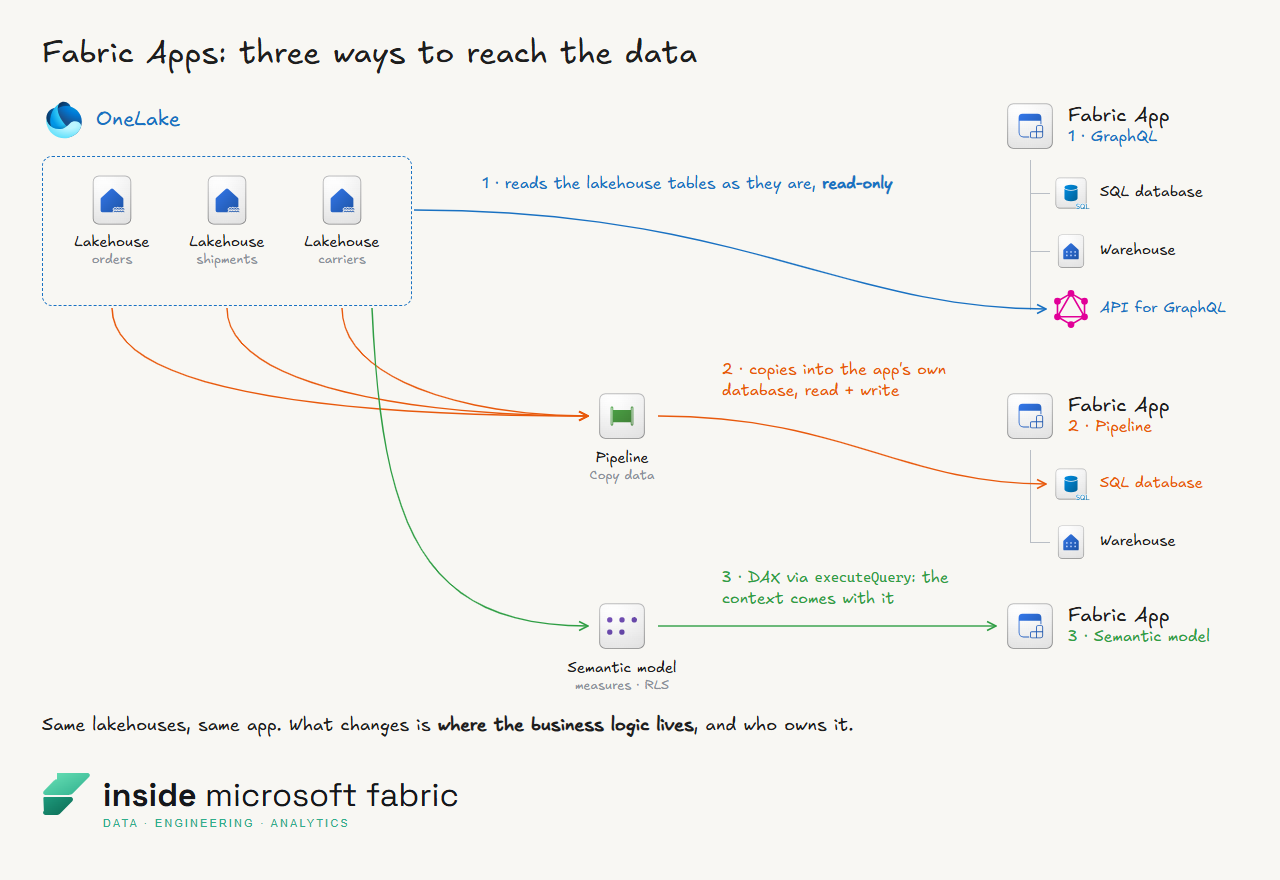
The three strategies
Fabric Apps (Rayfin) reaches data outside the app through connectors. From the Microsoft Learn page on connectors:
| Fabric item | Connector type | Operations |
|---|---|---|
| Lakehouse (SQL analytics endpoint) | fabric-sqlanalytics |
read |
| Warehouse | fabric-warehouse |
read, create, update, delete |
| SQL database in Fabric | fabric-sqldatabase |
read, create, update, delete |
| Semantic model | fabric-semanticmodel |
executeQuery |
The lakehouse, warehouse and SQL database connectors expose tables as typed entities, backed by GraphQL. The semantic model connector is different: it doesn’t expose tables, it runs DAX. All of them use delegated authentication, so each request runs as the signed-in user.
That gives three strategies.
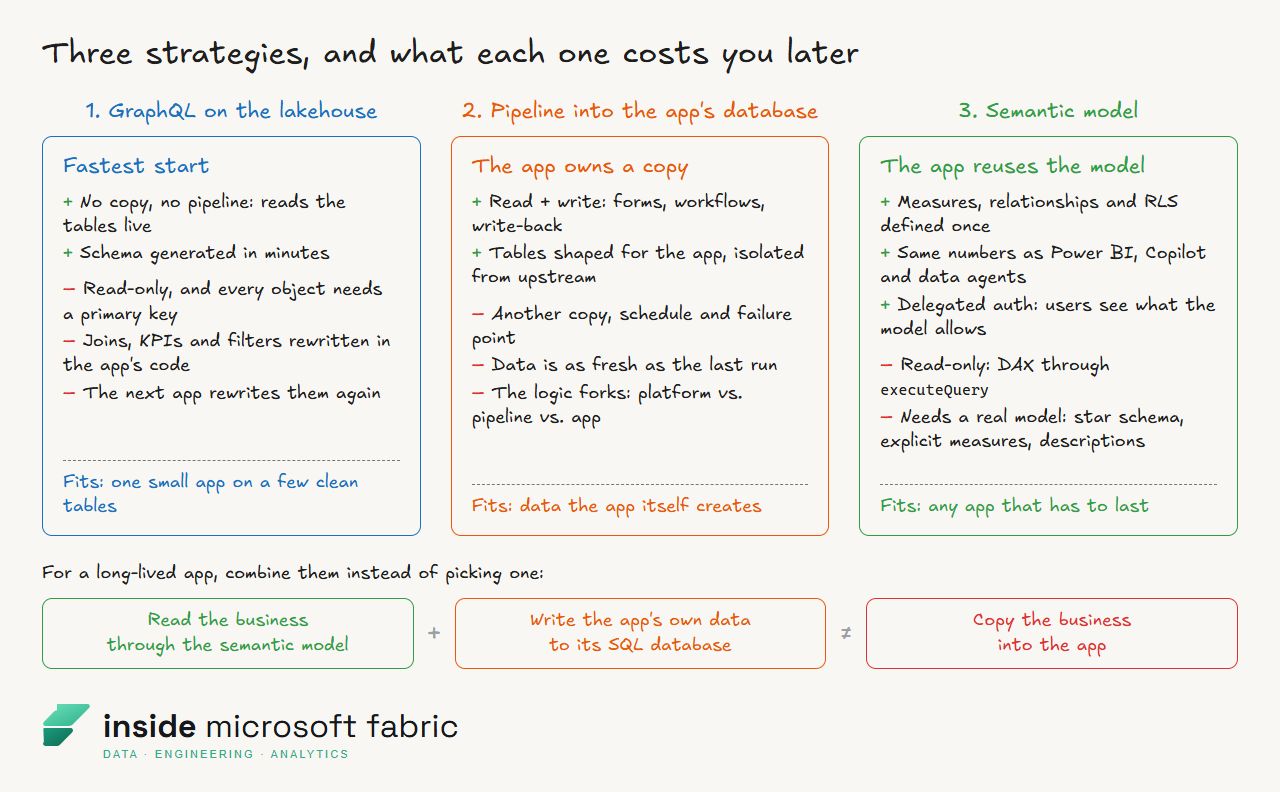
1. GraphQL on the lakehouse
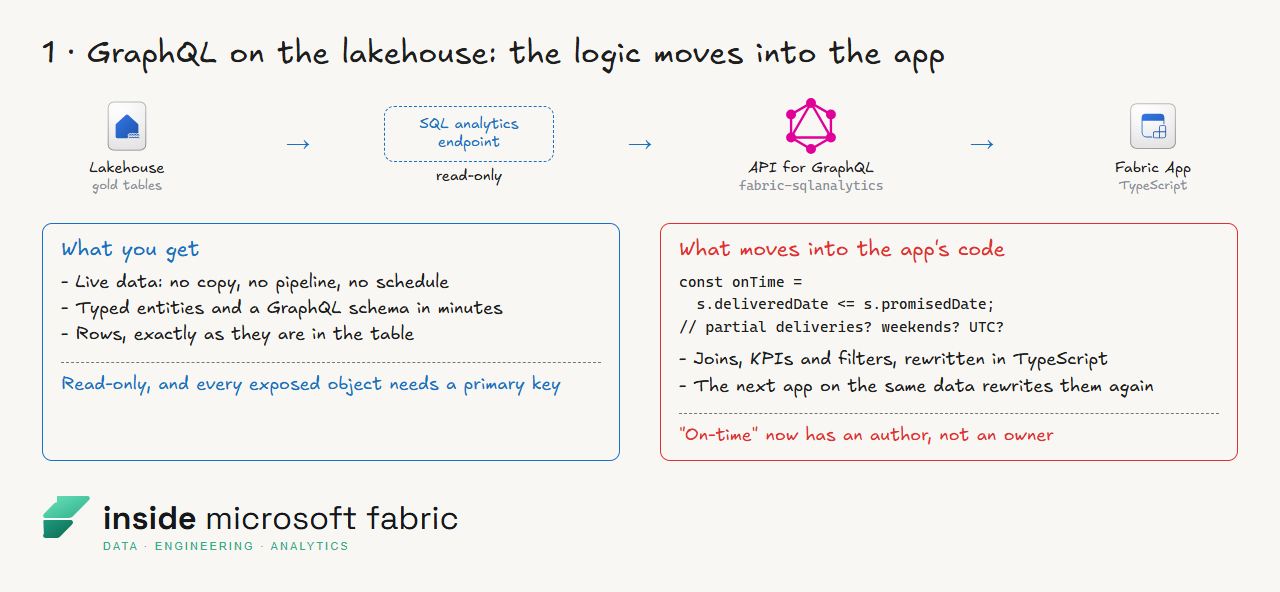
Point the app at the gold lakehouse and read the tables as they are.
npx rayfin connector add --type fabric-sqlanalytics \
  --workspace-id <workspace-id> --item-id <lakehouse-item-id> \
  --name logistics --operations read
const shipments = await client.connectors.logistics.Shipment
  .select(['shipmentId', 'carrierId', 'promisedDate', 'deliveredDate'])
  .first(200)
  .execute();
It’s the fastest start there is: no copy, no pipeline, live data. But look at what came back: rows. “Was this shipment on time?” isn’t in the table. The app has to decide: compare deliveredDate with promisedDate, decide what to do with partial deliveries, with weekends, with the carrier that reports in UTC. That decision now lives in TypeScript, inside one app.
Two technical limits too: the lakehouse path is read-only (the SQL analytics endpoint doesn’t take writes), and API for GraphQL needs a primary key on every object it exposes. Keyless objects, like an aggregate view, can’t be exposed at all, so check your tables and views before you design screens around them.
2. Pipeline into the app’s database
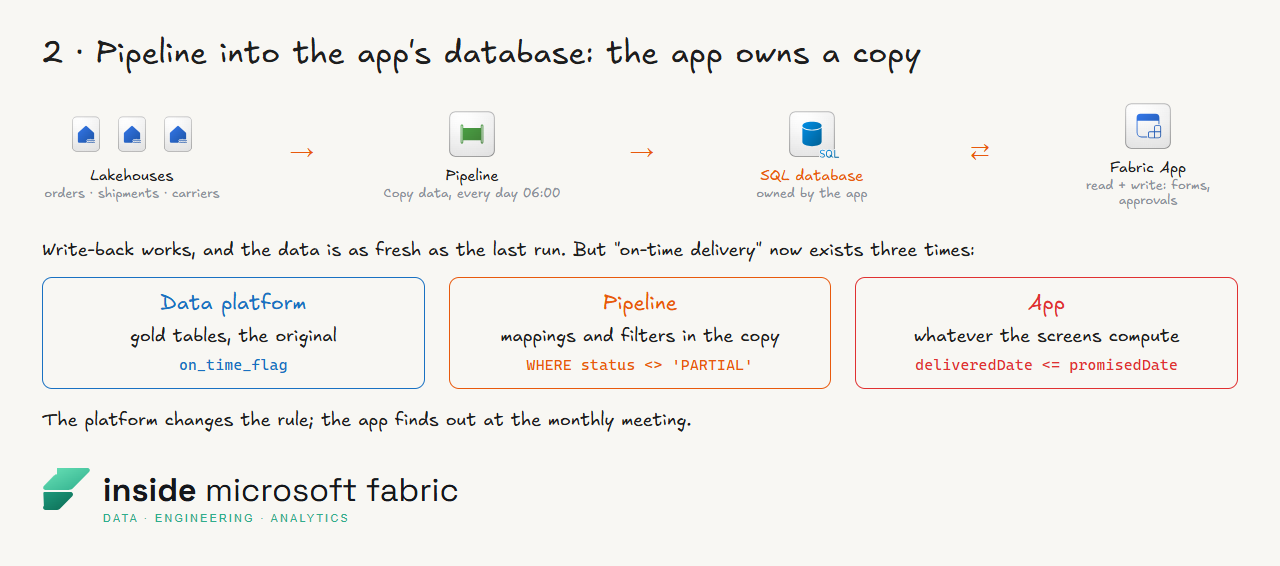
Copy what the app needs from the lakehouses into a SQL database (or warehouse) the app owns, with a pipeline and a Copy data activity. The app reads and writes there.
This is the strategy that unlocks write-back: approvals, comments, corrections, workflows. And the app gets tables shaped for its screens, isolated from upstream changes.
The price is a copy. Another schedule, another thing that fails at 6 a.m., data only as fresh as the last run. And the transformation logic forks: some of it in the data platform, some in the pipeline, some in the app. The first time the platform changes how a delivery is counted, the app doesn’t find out.
3. The semantic model
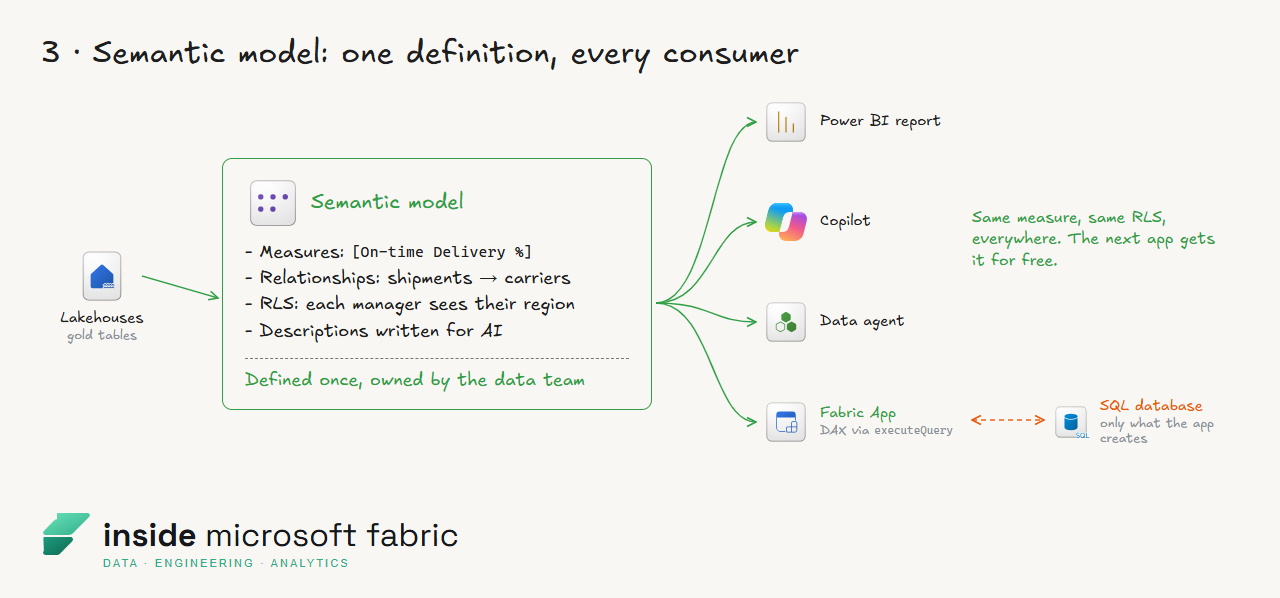
Connect the app to the semantic model your Power BI reports already use, and ask it questions in DAX.
npx rayfin connector add --type fabric-semanticmodel \
  --workspace-id <workspace-id> --item-id <semantic-model-item-id> \
  --name logisticsModel --operations executeQuery
const result = await client.connectors.logisticsModel.executeQuery({
  query: `
    EVALUATE
    SUMMARIZECOLUMNS(
      'Carrier'[Carrier Name],
      "On-time %", [On-time Delivery %],
      "Shipments", [Shipments]
    )`,
});
Now “on-time” isn’t decided by the app. [On-time Delivery %] is a measure, defined once in the model, the same one the Power BI report shows, the same one Copilot and data agents answer with. Relationships, RLS and descriptions come with it. The app gets the context, not just the rows.
The limits are real too:
- It’s read-only. The connector only supports
executeQuery. - It’s DAX, one query and one table per call. If it runs on the Power BI Execute Queries API, as everything suggests, its limits apply: 100,000 rows or 1,000,000 values per query, 120 queries per minute per user, and the Dataset Execute Queries REST API tenant setting must be on. Design screens that show answers, not screens that dump tables.
- It needs a good model. A flat table with implicit measures gives the app nothing a lakehouse table wouldn’t.
Note: “good model” is the same bar Microsoft sets for Copilot. The
semantic-model-authoringskill in Skills for Fabric puts it plainly: “A weak model cannot be rescued by AI instructions.” Star schema, explicit measures for every key metric, business-friendly names, descriptions. A model that’s ready for Copilot is ready for an app.
Pros and cons
| 1. GraphQL on the lakehouse | 2. Pipeline into the app’s DB | 3. Semantic model | |
|---|---|---|---|
| Time to first screen | Minutes | Hours | Minutes, if the model exists |
| Freshness | Live | Last pipeline run | Model refresh (or live with Direct Lake) |
| Write-back | No | Yes | No |
| Where “on-time” is defined | App code | Pipeline + app code | The model, once |
| Same number as Power BI | Only by luck | Only by discipline | By design |
| Security | Lakehouse permissions | Rules rebuilt in the app’s DB | Model RLS |
| Second app on the same data | Rewrites the logic | Another copy | Reuses the model |
For a long-lived app the answer isn’t to pick one. It’s to combine two:
- Read the business through the semantic model. Every number the app shows that someone could also see in a report comes from a measure.
- Write the app’s own data to its SQL database. Comments, approvals, assignments: data the app creates, and owns.
- Don’t copy the business into the app. That’s the one that looks free in week one.
Why this matters: we’ve seen this movie before
Let me tell you about a logistics dashboard. You’ve probably built one like it.
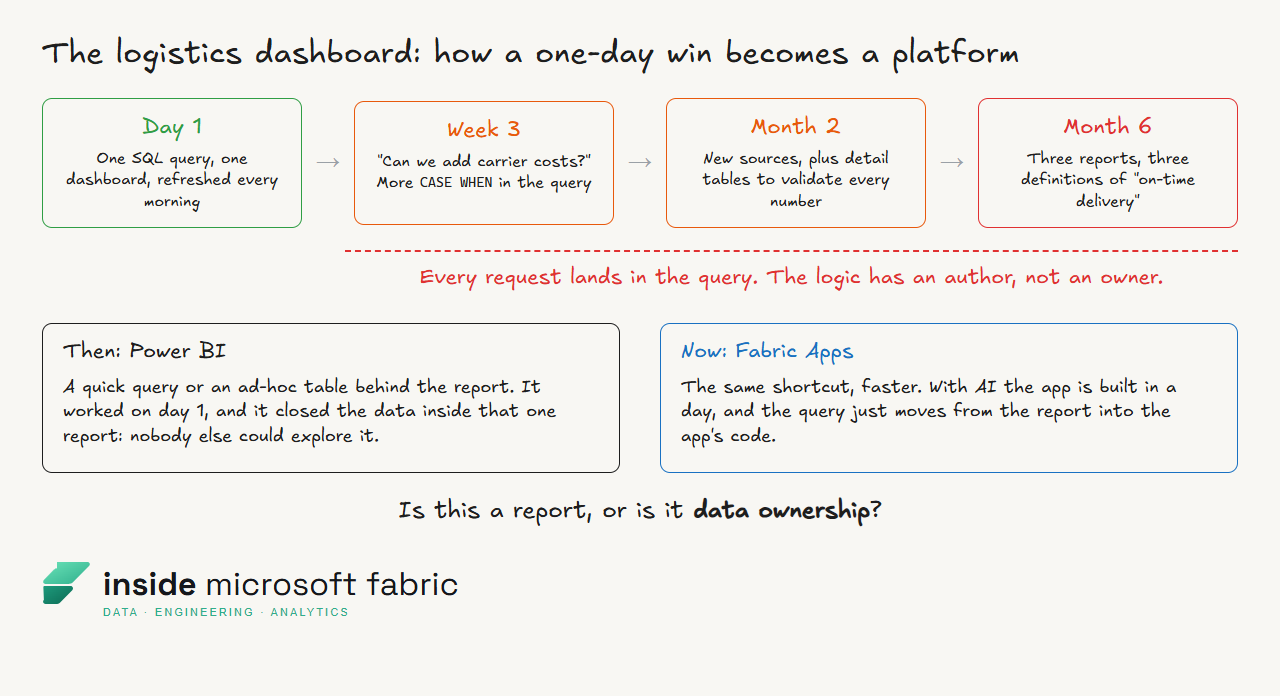
Day 1. Operations wants to see late shipments. You write one SQL query against the shipments table, build a dashboard on it, schedule the refresh for every morning. It looks great. Everyone is happy, and they should be: it took a day.
Week 3. “Can we add carrier costs?” Another join. “Partial deliveries shouldn’t count as late.” A CASE WHEN. “Except for this customer.” Another one.
Month 2. Finance wants it too, with their cost centres. A new source. And because nobody fully trusts the numbers anymore, someone asks for detail tables, so they can validate every figure line by line.
Month 6. There are three reports. Each one has its own copy of the query, slightly different. “On-time delivery” has three definitions, and the monthly meeting starts with fifteen minutes on which one is right.
At some point that stopped being a report. It became the company’s definition of on-time delivery, living in a query that one person wrote and nobody owns.
That’s the question I keep coming back to: is this about a report, or about data ownership?
Power BI went through this. The fast query or the ad-hoc table was never the mistake; it was the right way to win day one. The mistake was not noticing when it stopped being day one. The data stayed closed inside the report that created it, and every new question needed a new report.
Fabric Apps, and the FOMO of AI
Fabric Apps will go through it faster.
The demos are incredible, and they’re real: with Claude Code or Copilot as a pair programmer, an app that would have taken a quarter now takes a day. I did it myself. That’s exactly why the trap is bigger. When building is that cheap, the pressure is to build, now, before someone else does. The FOMO is about the app. Nobody has FOMO about the semantic model.
And strategy 1 is the one an AI assistant will hand you first: it’s the shortest path from “here’s my lakehouse” to “here’s a screen”. The query just moves from the report into the app’s TypeScript. Same shortcut, new place.
But the opportunity is real too. A Fabric App can do what a report never could: open the business context to people who don’t live in Power BI. A planner who needs to act on a late shipment, not look at a chart about it. A carrier manager who needs to correct a record, not export it to Excel. Apps meet people in their workflow, and that’s a genuinely new way to expose data.
It only works if the context comes with the data. An app that reads the semantic model shows the same truth as the report, with the same security, and the next app gets it for free. An app that reads raw tables starts its own truth, and in six months you’re back in the meeting about which number is right.
The recommendation
- Prototype however you want. GraphQL on the lakehouse is fine for a demo, a spike, an app with an end date.
- Before it becomes “the” app, ask where the logic lives. If the answer is “in the app’s code” and the numbers also exist in a report, move them into the model.
- Build the model first, for the long-lived ones. Star schema, explicit measures, RLS, descriptions. The same work makes it ready for Copilot and data agents.
- Give the app a database only for what the app creates. Write-back, workflow state, annotations. Not a copy of the business.
- Copy with a pipeline only when you must, and treat that pipeline as part of the data platform, with an owner, not as part of the app.
Fabric Apps makes building cheap. It doesn’t make owning the logic cheaper. The semantic model is where that ownership already lives, so that’s where a long-term app should read from.
Are you building Fabric Apps on top of existing data? I’d love to hear which of the three you picked, and whether it’s still the right one six months in.
Enjoyed this?
Get new articles like this one straight to your inbox.