
12 Oct 2026 · Data Engineering, Spark
Migrating to Fabric Runtime 2.0 and the Native Execution Engine: a hands-on guide
Runtime 2.0 and the NEE are two changes with two different failure modes. Stabilise the runtime first, turn on the engine second — and how to do both with an Environment managed as code.
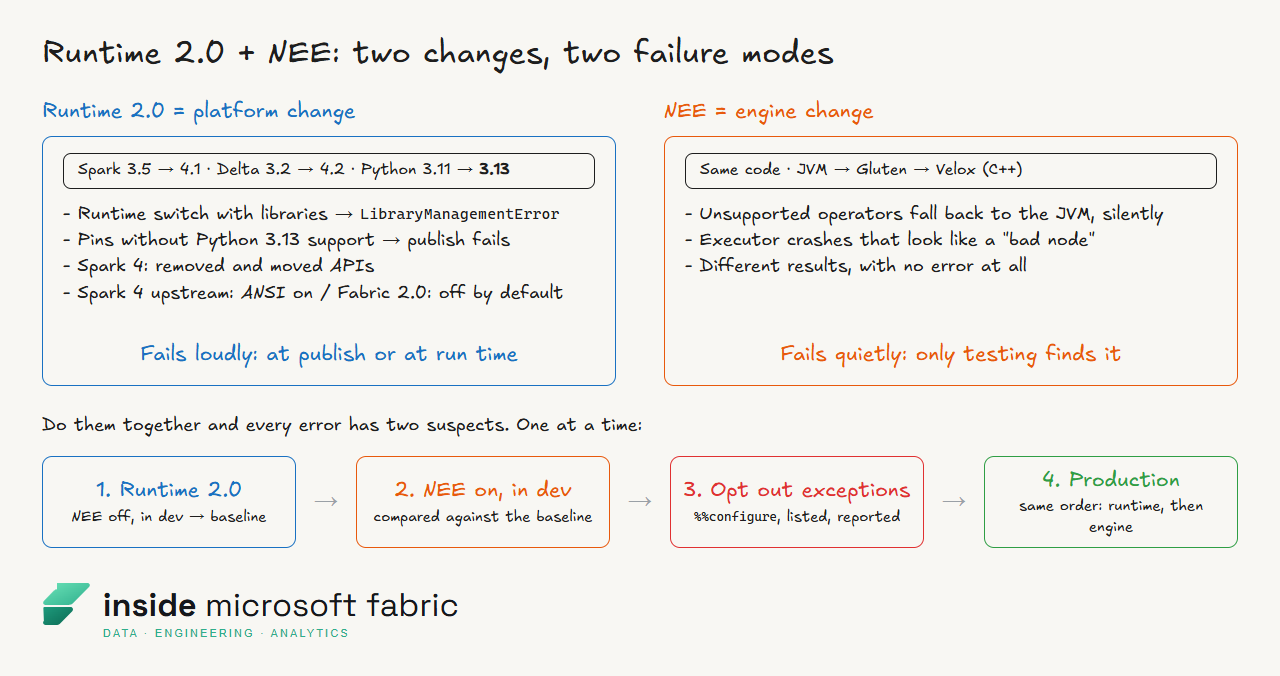
Runtime 2.0 brings Spark 4 to Microsoft Fabric, and the Native Execution Engine (NEE) promises faster Spark without changing your code. It’s tempting to do both at once: change the runtime, flip spark.native.enabled to true, publish, done.
Don’t. They’re two different changes with two different failure modes, and when you do them together every error has two suspects.
This guide has two parts:
- Part 1 — What changes and what can break: the problems you can hit with Runtime 2.0, what the NEE actually does, and why you should stabilise the runtime first and turn on the NEE second.
- Part 2 — Step by step with fabric_environment: the same migration with an Environment managed as code.
If you want the background on what Runtime 2.0 brings, start with Fabric Runtime 2.0: What’s New, and Should You Use It Yet? (written during the preview).
Part 1 — What changes and what can break
Runtime 2.0 is a platform change
| Runtime 1.3 | Runtime 2.0 | |
|---|---|---|
| Spark | 3.5 | 4.1 |
| Delta Lake | 3.2 | 4.2 |
| Python | 3.11 | 3.13 |
| Status | GA | GA |
Three things in that table can break a working setup.
1. You can’t just switch the runtime of an Environment with libraries
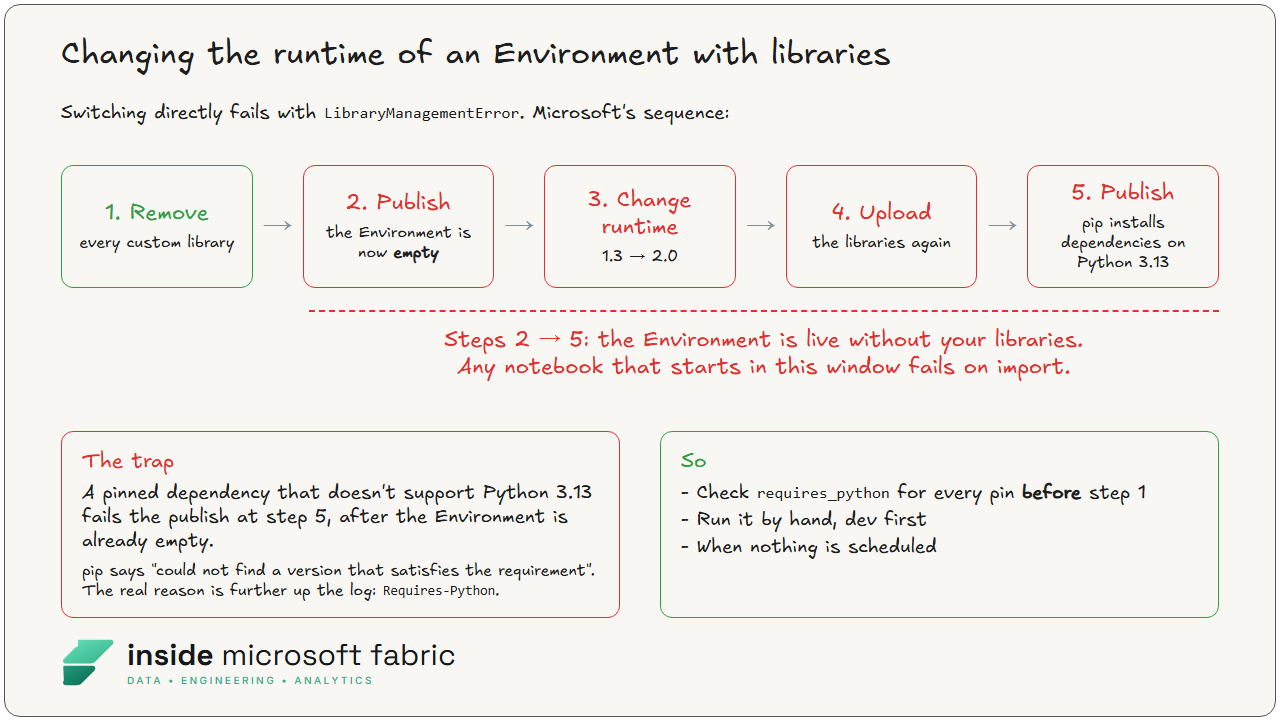
If your Environment has a custom library published (a .whl with your shared code, for example), changing the runtime directly fails with LibraryManagementError. Microsoft’s sequence is:
- Remove every custom library
- Publish (the Environment is now empty)
- Change the runtime
- Upload the libraries again
- Publish
Between step 2 and step 5, the Environment is live without your libraries. Any notebook that starts in that window fails on import. Do it by hand, in dev first, when nothing is scheduled.
2. Your dependencies have to support Python 3.13
When the Environment publishes, Fabric installs your library’s dependencies from PyPI with the runtime’s Python. A package pinned to a version that only supports Python < 3.13 can’t be installed, and the publish fails:
ERROR: Could not find a version that satisfies the requirement some-package==1.2.3
       (from versions: 1.4.0, 1.5.0, ...)
[ImpulseErrorCode:Spark_User_LPS_PIP_PACKAGE_NOT_FOUND]
pip’s message hides the real reason. Look further up in the publish log for Requires-Python and for the Python path (.../python3.13/site-packages).
This one is nasty combined with point 1: if you find out at step 5, the Environment is already empty. Check every pinned dependency against Python 3.13 before migrating: look at requires_python on PyPI for the exact version you pin, and pick the smallest upgrade that supports both Python 3.11 and 3.13 if dev and production run different runtimes for a while.
3. Spark 4 is a major version
Code that ran on Spark 3.5 isn’t guaranteed to behave the same on Spark 4. Before migrating, read the Spark 4 migration guide and the Runtime 2.0 release notes, and pay attention to:
- Stricter SQL semantics: Spark 4 turns ANSI mode on by default, but Fabric Runtime 2.0 doesn’t: in my tests
spark.sql.ansi.enabledisfalse, soCAST('abc' AS INT)still returnsnull. Check it in your own session withspark.conf.get("spark.sql.ansi.enabled"), and replace risky casts withTRY_CASTnow so a future change doesn’t surprise you. - Removed and moved APIs: deprecated functions removed, modules reorganised. Code that relied on names a module happened to import can stop resolving.
- Preinstalled packages: several Python and R packages that shipped with Runtime 1.3 are no longer preinstalled, so something that worked without configuration may need to be added explicitly to your Environment.
- JVM libraries: custom JARs have to be rebuilt for Java 21 and Scala 2.13. SparkR is deprecated.
- Python 3.13 itself: packages with C extensions need wheels for 3.13; very old pins usually don’t have them.
The only reliable test is running your real pipelines on Runtime 2.0 in dev, end to end.
The NEE is an engine change
What it actually does
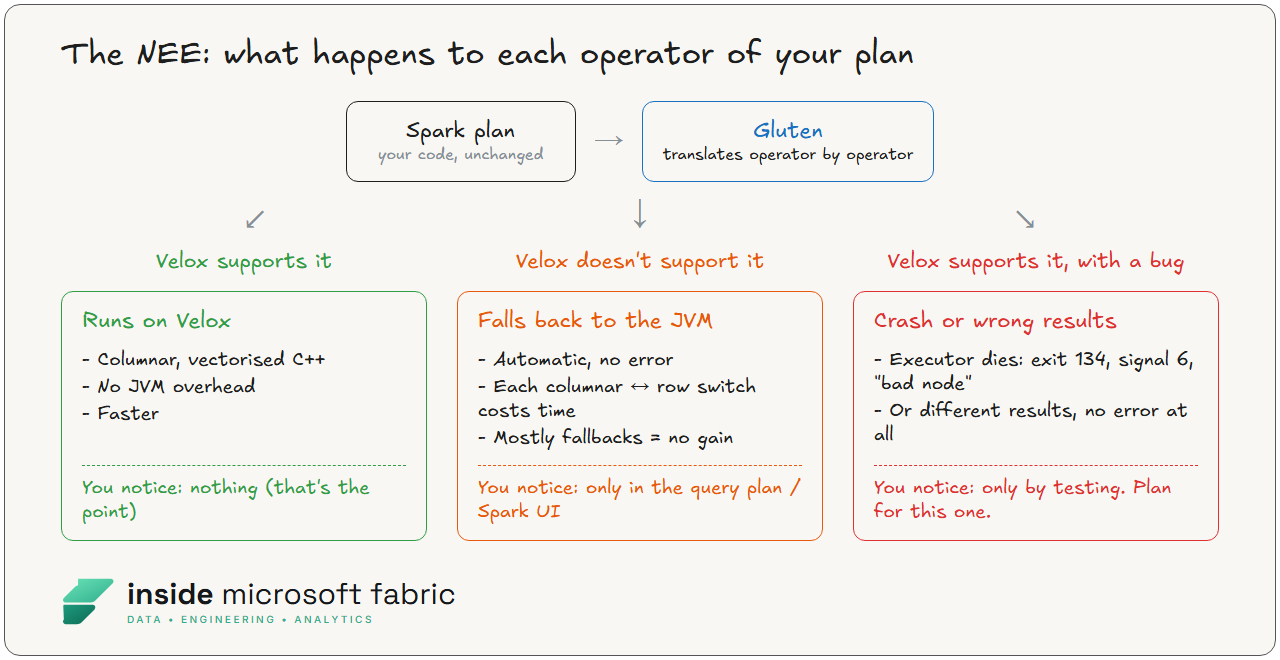
Without the NEE, Spark plans run on the JVM. With spark.native.enabled=true, Fabric uses Gluten to translate each operator of the plan to Velox, a vectorised C++ engine. Your code is the same; what executes it isn’t.
For every operator, one of three things happens:
| Effect | How you notice | |
|---|---|---|
| Velox supports it | Faster: columnar, vectorised, no JVM overhead | — |
| Velox doesn’t support it | Fallback: that part runs on the JVM, automatically. No error, but every switch between engines (columnar ↔ row) costs time | Query plan / Spark UI |
| Velox supports it, with a bug | Crash, or different results with no error at all | Only by testing |
The third row is the one to plan for.
What a NEE crash looks like
It doesn’t look like a NEE problem. A typical one:
ExecutorLostFailure ... Reason: Container from a bad node ... Exit status: 134 (died from signal 6?)
“Bad node” sounds like infrastructure. The native stack trace in the executor log tells the real story:
C  [libvelox.so]  FlatVector<StringView>::copyRanges(...)
C  [libvelox.so]  exec::Unnest::generateOutput(...)
C  [libgluten.so] ColumnarBatchOutIterator_nativeHasNext
libgluten/libvelox: native code, so it’s the NEE.Unnest: the Velox operator behindexplode/posexplode/inline. The operator name tells you which part of your code to look at.- Signal 6 / exit 134: the native code aborted. There’s no exception to catch in C++: the whole executor dies, so Spark reports a lost container.
- The same task fails on every retry while the others succeed: it’s deterministic and data-dependent.
- The Python traceback points at the action (
save,count,write…), not at the transformation that crashed, because Spark is lazy.
Code patterns to check first
These are the usual sources of fallbacks, differences and crashes:
- Complex types:
explode,posexplode,inline,from_json,arrays_zip - Regular expressions: Velox uses RE2, which has no lookahead
(?=...)or backreferences\1 - Dates and times: lenient
to_date/to_timestampformats, time zones, legacy datetime rebase modes - Casts from dirty strings to numbers or dates
- Python UDFs and
pandas_udf: always on the JVM, so every one is a round trip between engines - High-precision decimals and rounding
Don’t work around it mid-session
When a write crashes on the NEE, it’s tempting to catch the error and retry with spark.conf.set("spark.native.enabled", "false"). Avoid it:
- It hides the problem: the job “works” and nobody knows which tables can’t run natively.
- It wastes time: Spark exhausts every task retry before your code even sees the error.
- Engine settings aren’t guaranteed to apply cleanly in the middle of a session.
If a notebook can’t run on the NEE, opt it out explicitly, at session start, in its first cell:
%%configure
{"conf": {"spark.native.enabled": "false"}}
The recommendation: one change at a time
- Runtime 2.0 first, NEE off. Fix dependencies and Spark 4 issues until your pipelines run cleanly in dev. This is your baseline.
- Then the NEE, in dev, validated against that baseline:
- Fallbacks: run with the NEE on and check the Spark UI (Queries for Native Engine / Gluten tab). Mostly fallbacks means the NEE gains nothing for that notebook.
-
Results: same inputs, one run with the NEE and one without, compared:
assert df_nee.schema == df_jvm.schema
assert df_nee.count() == df_jvm.count()
assert df_nee.exceptAll(df_jvm).count() == 0
assert df_jvm.exceptAll(df_nee).count() == 0
For big tables, compare per-column checksums instead of
exceptAll. - Performance: duration and capacity units. The NEE shines on large scans, joins and aggregations; on small tables it may not help.
- Stability: run the full orchestration several times, on production-like volumes. Crashes are data-dependent, and sample data can hide them.
- Opt out the exceptions with
%%configure, keep the list, and report each crash to Microsoft with the native stack trace (operator + function). - Production last, same order: runtime, then engine.
Note: Runtime 2.0 is generally available and supported for production, but you still have to opt into it explicitly, so don’t assume your workspace has moved. Plan the migration rather than waiting.
Part 2 — Step by step with fabric_environment
fabric_environment manages a custom Environment as code: one config file per stage, a shared library (.whl) and a deploy.py that applies everything with a Service Principal from Azure DevOps. The reasoning behind it is in Build › Custom Environment, and the Custom Environment Builder generates the config files for your workspaces.
// deploy/environment_dev.jsonc
{
  "environmentName": "...",
  "runtimeVersion": "1.3",
  "sparkProperties": { "...": "true" },
  "compute": { "<workspace>": {} }
}
It covers the pitfalls from Part 1:
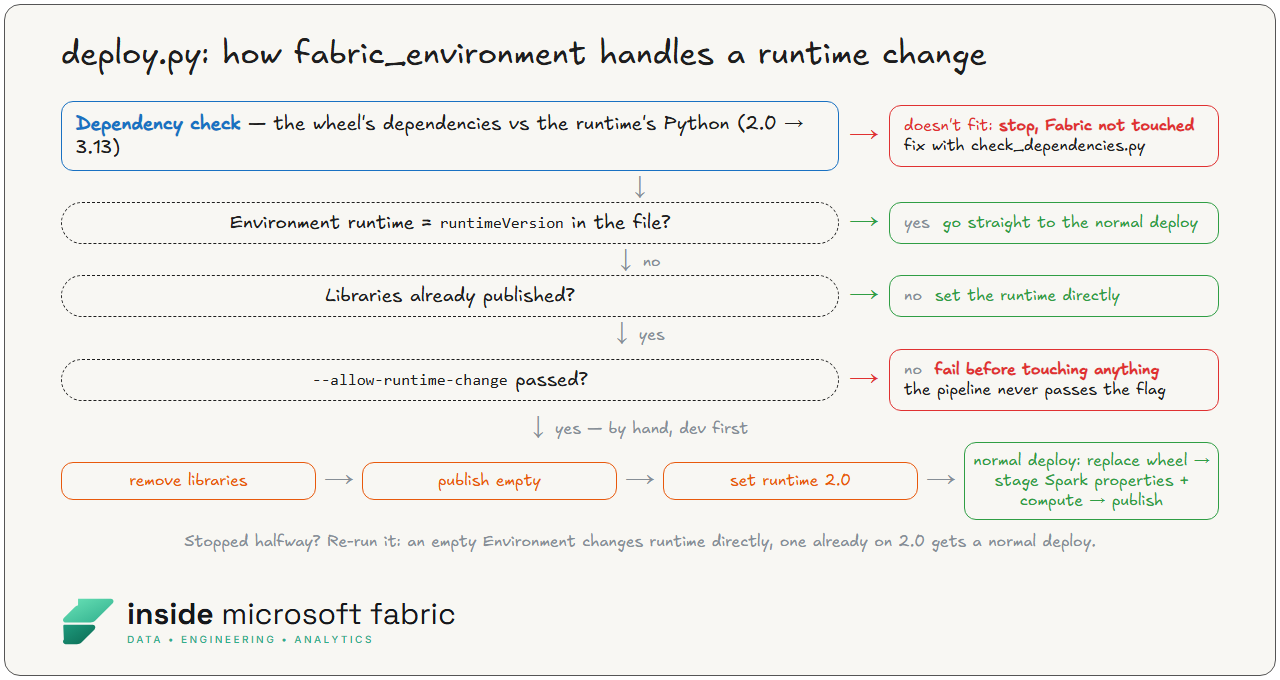
- The runtime change sequence is built into
deploy.py, behind an explicit flag the pipeline never passes. - A dependency check against each runtime’s Python runs before anything touches Fabric, and in the pipeline’s build stage.
sparkPropertiesis declarative: remove a property from the file and the next deploy removes it from the Environment. That’s how you turn the NEE on and off.
Phase 1 — Runtime 2.0, NEE off
1. Change the runtime in dev only, and make sure the NEE is not in sparkProperties:
"runtimeVersion": "2.0",
"sparkProperties": {
  "spark.databricks.delta.autoCompact.enabled": "true"
}
deploy/examples/environment_runtime_2_0.jsonc shows a full 2.0 file. Several Delta optimisations that are opt-in on 1.3 are on by default in 2.0, so you can drop them. Leave its spark.native.enabled line out for now.
2. Check the config and the dependencies:
python deploy/deploy.py --target dev --validate-only
python deploy/check_dependencies.py
check_dependencies.py reads each stage’s runtime, maps it to its Python (1.3 → 3.11, 2.0 → 3.13) and checks every dependency in pyproject.toml on PyPI. If one can’t be installed, it proposes the minimum later version that works on every stage, and applies it if you confirm (it also bumps the package’s patch version, so the new wheel is distinguishable):
Runtimes: dev 2.0 (Python 3.13), pro 1.3 (Python 3.11)
[!] Incompatible dependencies:
  - some-package==1.2.3: can't be installed on Python 3.13
      proposal: some-package==1.4.0  (latest compatible: 1.5.0)
Apply the proposal to pyproject.toml and bump the package version? [y/N]
3. Build and migrate dev, by hand, when nothing is scheduled:
python -m build --wheel
python deploy/deploy.py --target dev --whl dist/<wheel>.whl --allow-runtime-change
Before touching Fabric, deploy.py checks the wheel’s dependencies against Python 3.13 and stops if one doesn’t fit. Then, per workspace: remove libraries → publish empty → set runtime 2.0 → upload the wheel → stage Spark properties and compute → publish. If it stops halfway, re-run it: an Environment that’s already empty changes runtime directly, and one already on 2.0 just gets a normal deploy.
Without --allow-runtime-change, a runtime mismatch fails before touching anything. That’s what the pipeline does, so editing runtimeVersion and pushing can never empty an Environment unattended.
4. Verify and stabilise. Run notebooks/nb_check_environment.ipynb in a new session, then your real pipelines in dev. Fix Spark 4 issues until dev runs cleanly. If a dependency upgrade changed an API, test what uses it here.
Phase 2 — Turn on the NEE in dev
5. Add it to the config:
"sparkProperties": {
  "spark.native.enabled": "true",
  "spark.databricks.delta.autoCompact.enabled": "true"
}
6. Normal deploy. The runtime and the wheel don’t change, so no flag:
python deploy/deploy.py --target dev --whl dist/<wheel>.whl
7. Validate as in Part 1: fallbacks in the Spark UI, results compared against a NEE-off run, performance, stability on real volumes. Opt out the notebooks that fail with %%configure and keep the list.
Rolling back is one line. Remove spark.native.enabled from the file and deploy again: the property is removed from the Environment (the API merges properties, so deploy.py sends removed ones with a null value). The NEE is off by default, so there’s no need to set it to "false".
Phase 3 — Production
8. Same two phases on environment_pro.jsonc: runtime first, NEE second. The runtime change is by hand with --allow-runtime-change. After that, normal releases go through the pipeline: build (config validation + dependency check) → dev → approval → production.
Checklist
Before Runtime 2.0
- Every pinned dependency installs on Python 3.13 (and 3.11, if stages differ)
- Spark 4 migration guide reviewed: removed APIs, preinstalled packages, JARs (Java 21 / Scala 2.13)
TRY_CASTinstead of bareCASTon dirty data (ANSI is off by default in Fabric 2.0, but not in upstream Spark 4)- Runtime change planned in dev, by hand, outside scheduled runs
Runtime 2.0, NEE off
- Full pipelines run cleanly in dev
- Then production
NEE
- Risky patterns identified (
explode, regex, dates, casts, UDFs) - Fallbacks checked, results compared, performance compared
- Stable over several runs with real volumes
- Exceptions opted out with
%%configure, listed, reported
The runtime is a platform change; the NEE is an engine change. Each one is manageable on its own. Run them as two experiments, one at a time, and when something breaks you’ll know exactly where to look.
Enjoyed this?
Get new articles like this one straight to your inbox.