
26 Nov 2026 · Data Engineering, Spark
Spark vs DuckDB vs Polars on Fabric: I benchmarked 10 production notebooks
Ten Silver notebooks moved from Spark to DuckDB and Polars in a Python notebook, every output checked against Spark, at three data sizes. One machine used 66–86% fewer capacity units every time. Here's what that means for your hourly loads, your daily ETL and your API scripts.
Most Silver notebooks don’t need a cluster. Everyone suspects it, few people measure it, and nobody wants to migrate a working pipeline on a hunch.
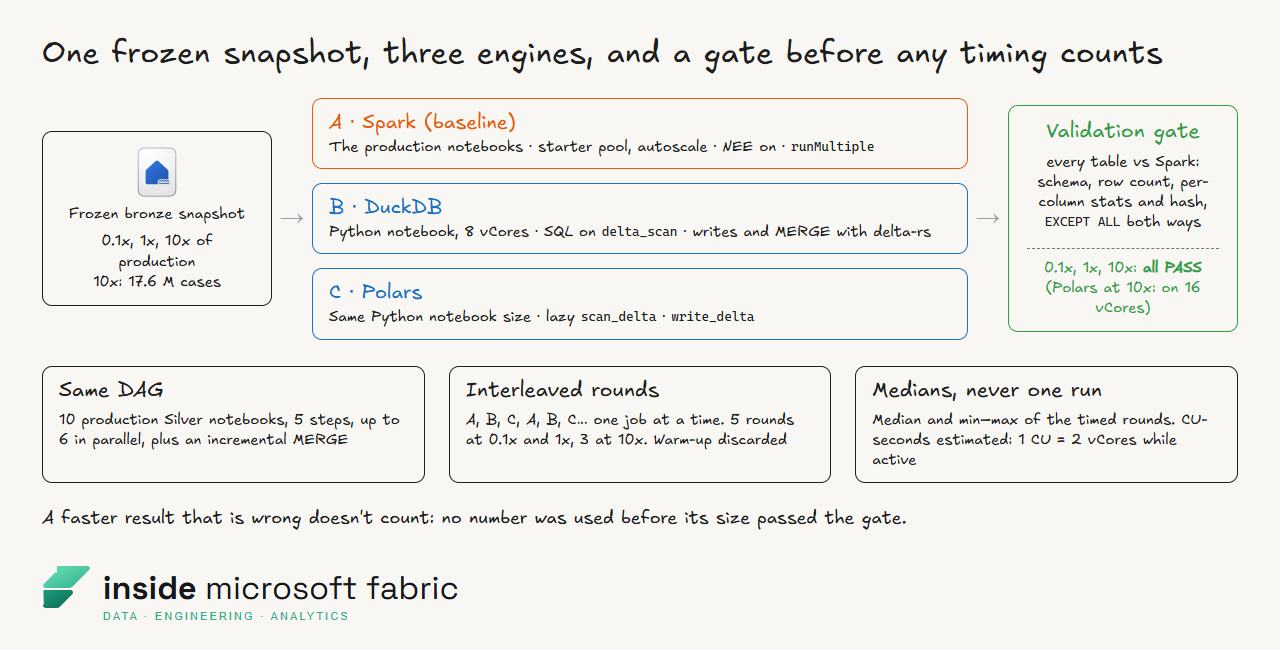
So I measured it. I took 10 production Silver notebooks, rewrote them for DuckDB and for Polars in a Fabric Python notebook, checked that every output row matched Spark, and ran all three at 0.1x, 1x and 10x of production volume.
The short answer: one machine with DuckDB used 73–83% fewer capacity units than Spark at every size, and Polars was the fastest everywhere. Spark didn’t win anywhere up to 10x. The gap does narrow as data grows, and one notebook shows where it will close first.
The short version
- One machine is cheaper. At every size, DuckDB and Polars in a Python notebook used between two thirds and six sevenths less capacity than Spark for the same 10 notebooks.
- It’s also faster, until it isn’t. At 1x DuckDB finished in half of Spark’s time. At 10x it was almost level, and the biggest join was already slower than on Spark.
- DuckDB is the safe default, Polars the fast one. Polars ran out of memory at 10x on 8 vCores; DuckDB never did.
- The answer isn’t “replace Spark”. It’s a rule per notebook: one machine until a notebook’s memory or run time says otherwise.
If you only want to know which of your jobs should run this way, jump to Where a Python notebook fits.
DuckDB, Polars and Spark in one minute
DuckDB is an analytical SQL database that runs inside your Python process. No server, no cluster, nothing to install in a Fabric Python notebook: import duckdb and you write SQL. It stores and processes data by column, uses every core of the machine, and when a query needs more memory than it has, it spills to disk instead of failing. It reads Parquet and Delta tables directly, so it can query a lakehouse table without loading it first. Think of it as SQLite, built for analytics instead of transactions.
Polars is a DataFrame library, like pandas but written in Rust: multi-threaded, and lazy, so it plans the whole query before reading any data. It’s often the fastest of the three. The catch, as you’ll see, is memory.
Spark is a distributed engine. A driver splits the work across executors on several machines. That’s what you need when the data doesn’t fit on one machine. When it does, you still pay for the coordination: planning, scheduling, moving data between nodes, and executors waiting for work.
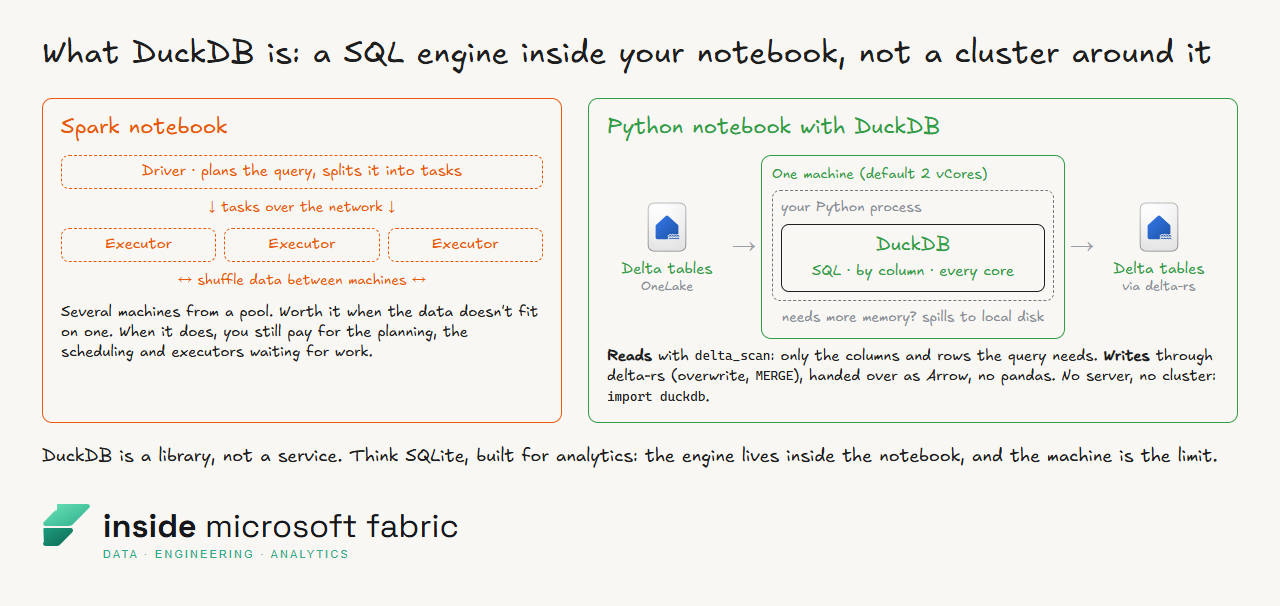
In Fabric, the choice shows up as the notebook type. A Spark notebook starts a Spark session on a pool. A Python notebook starts one machine (2 vCores and 16 GB by default) with DuckDB, Polars and delta-rs already installed. This benchmark is about that choice.
What I tested
The question, written down before the first run: one machine wins on small and medium tables, Spark wins above some size. Where is that size?
The workload: 10 notebooks from a production Salesforce Silver layer. Small lookup tables of a few dozen rows, a wide fact table of 1.8 million rows (17.6 million at 10x), heavy string and date logic, an incremental MERGE, and a dependency chain of five steps with up to six notebooks running in parallel. The kind of DAG most Silver layers look like.
The rules, fixed in advance so the numbers couldn’t be read any way I liked. A setup only counts as a candidate to replace Spark for a notebook if:
- It writes exactly the same output as Spark.
- It uses at least 30% fewer capacity units (CU).
- It doesn’t run out of memory at the largest size, with at least 20% memory to spare.
The method, in plain words. Every run read the same frozen copy of the data. Only the engine changed. Before timing anything, a validation notebook compared every output table with Spark’s, row by row. Then the three engines took turns, one job at a time, five rounds at the small sizes and three at 10x. Every number below is the median of those rounds.
Note: the CU numbers are estimated. I’m not the capacity admin on the trial, so I had no Capacity Metrics app. I used the billing rule instead: 1 capacity unit = 2 Spark vCores while the session runs, and assumed the same for Python notebooks. Good for comparing the three setups, not a copy of your bill.
Results
Capacity units and run time
All 10 notebooks, median of the timed rounds. CU-seconds is the capacity the whole run consumed.
| Size | Spark | DuckDB, 8 vCores | Polars |
|---|---|---|---|
| 0.1x | 1,501 CU-s · 170 s | 367 CU-s (−76%) · 92 s | 295 CU-s (−80%) · 74 s |
| 1x | 3,021 CU-s · 273 s | 522 CU-s (−83%) · 130 s | 425 CU-s (−86%) · 106 s |
| 10x | 7,383 CU-s · 534 s | 2,015 CU-s (−73%) · 504 s | out of memory on 8 vCores; on 16 vCores 2,495 CU-s (−66%) · 312 s |
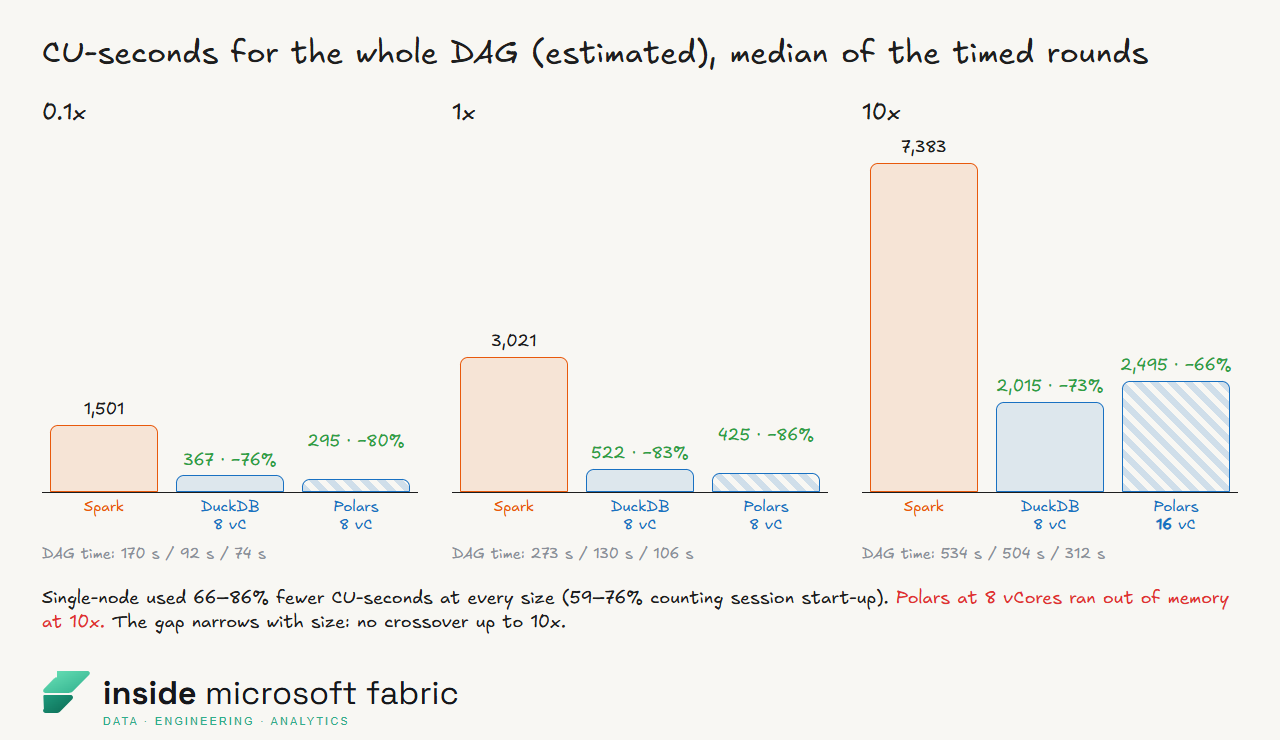
Three things explain the table.
Spark pays for a pool, a Python notebook pays for one machine. At 1x, Spark averaged about 11 CU during the run, because the starter pool adds executors that small tables can’t keep busy. DuckDB held 4 CU (8 vCores) for less than half the time.
Small tables are where Spark loses most. Spark spent 20–35 seconds on each small notebook, at every size, because even 39 rows go through a distributed plan. DuckDB did the same notebooks in 5–15 seconds.
Start-up is a cost too, and it doesn’t change the answer. A Python notebook with a custom size took 74–80 seconds to start in every round. Counting that start-up, the saving is still 59–76%. Spark started in 20–35 seconds when warm, and Spark doesn’t bill for acquiring the cluster, which makes that comparison generous to Spark.
Where Spark comes back first
The saving shrinks with size: DuckDB went from −83% at 1x to −73% at 10x. One notebook explains most of it.
dt_case, the fact table with the biggest join, took 6.3 times longer on DuckDB going from 1x to 10x (51 → 322 seconds). On Spark, 2.2 times longer (111 → 245 seconds). At 10x it’s the one notebook where Spark is clearly faster, and the one with the least memory to spare (47% free at its peak).
If this workload grew to 30x or 50x, dt_case would be the first notebook to move back to Spark. I didn’t test beyond 10x, so exactly where is a guess.
Memory: DuckDB slows down, Polars falls over
Polars was the fastest engine at every size. It also ran out of memory at 10x on 8 vCores (64 GB) in every round, and only finished on 16 vCores (128 GB).
The difference is a setting. DuckDB has a memory_limit per notebook and spills to disk when it needs more: it gets slower, but it finishes. Polars has no equivalent cap, so two heavy notebooks running in parallel can take the whole session down. In production, finishing beats being fast.
The decision
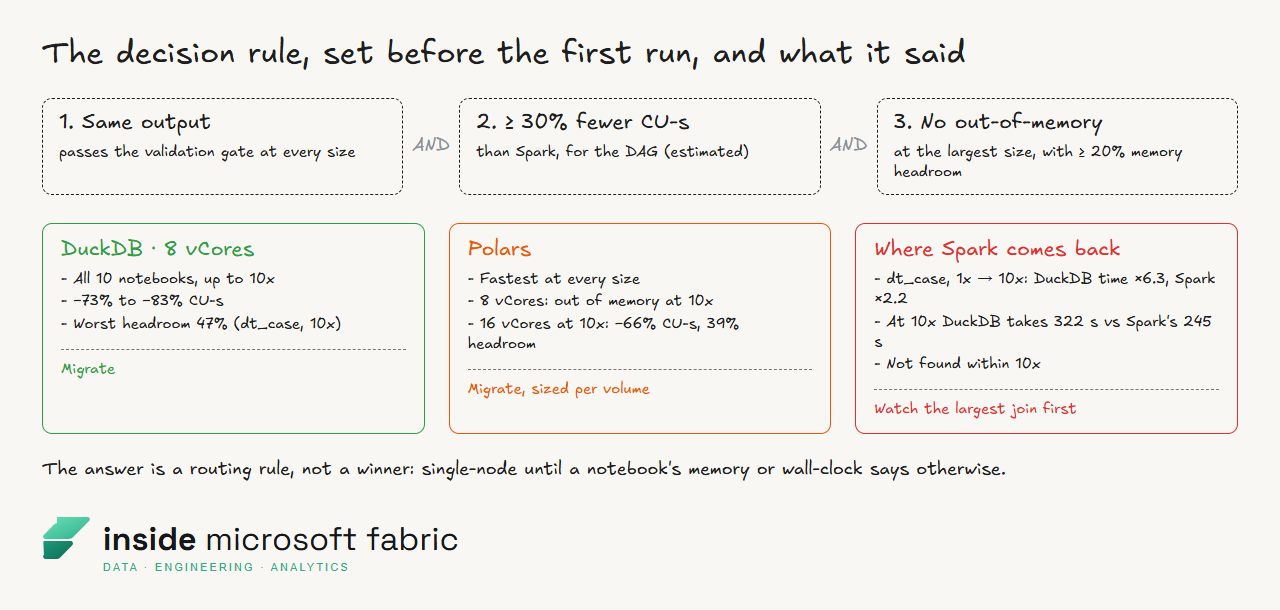
- DuckDB on 8 vCores passes all three rules for all 10 notebooks, up to 10x. It’s the one to move to.
- Polars passes up to 1x on 8 vCores, and at 10x only on 16. Faster, but it has to be sized for the biggest volume it will ever see.
- No crossover up to 10x. The first notebook to cross will be
dt_case, on run time before cost.
Where a Python notebook fits
The benchmark answers “is it cheaper?”. The more useful question is which of my jobs should run this way. After the benchmark and our first Python notebooks in production, I sort jobs into three groups.
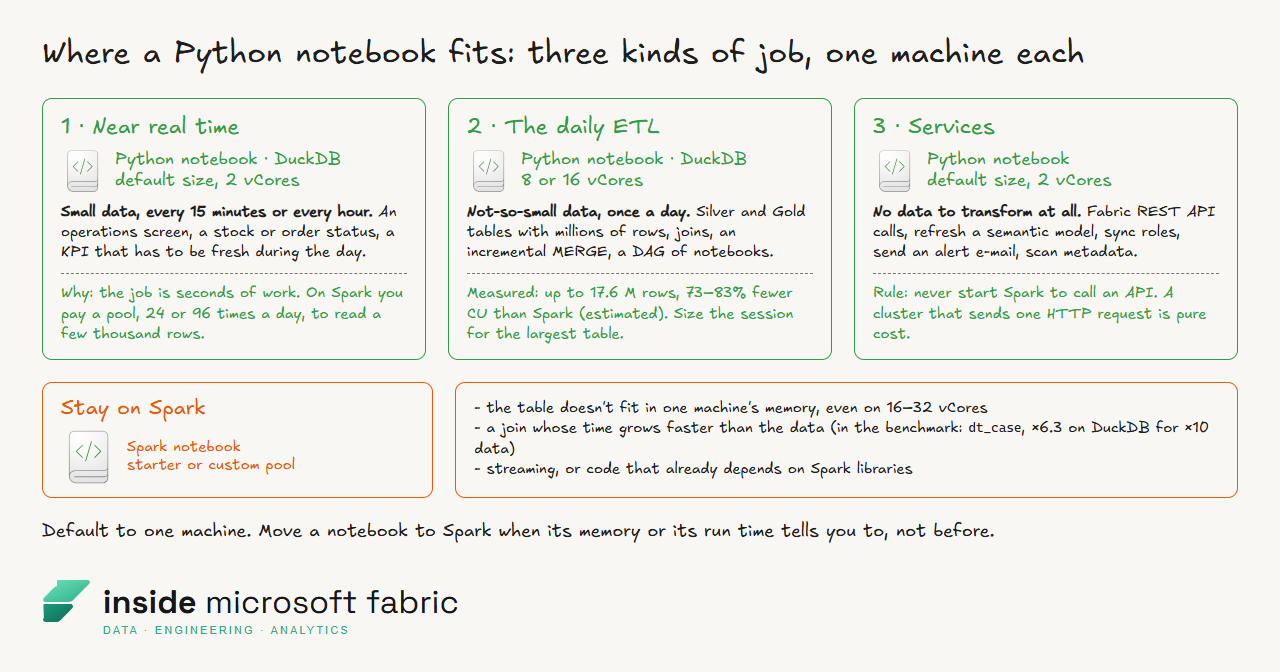
1. Near real time: small data, every few minutes
A warehouse screen that shows today’s open orders. A stock level that sales checks before calling a customer. A KPI that has to be right at 11:00, not tomorrow morning. These jobs read a few thousand rows, join three or four tables and write one small table, every 15 minutes or every hour.
This is where Spark is most wasteful. The work takes seconds; the session and the pool around it are the rest. And you pay for that 24 times a day if it runs hourly, 96 times if it runs every 15 minutes. The small notebooks in the benchmark are exactly this shape: 20–35 seconds each on Spark, 5–15 on DuckDB, at a fraction of the capacity.
We already run one in production this way: the hourly Bronze-to-Gold load behind a logistics screen, a Python notebook with DuckDB at the default size. The same logic used to be a Spark notebook.
Two things to keep in mind:
- Keep these at the default size (2 vCores, 16 GB). That’s what a Python notebook gets out of the box, and it’s plenty for a few hundred thousand rows. In the benchmark, sessions with a custom size always took 74–80 seconds to start.
- Start-up isn’t guaranteed. Microsoft states that a Python notebook can take up to three minutes to start when it doesn’t get a session from the live pool. Fine for hourly, tight for every 5 minutes. Below that, a scheduled notebook is the wrong tool: look at Real-Time Intelligence instead.
2. The daily ETL: not-so-small data, once a day
This is the benchmark itself: a Silver layer of 10 notebooks, the biggest table at 1.8 million rows in production, a DAG with parallel steps and an incremental MERGE. At 10 times that volume, DuckDB on one 8-vCore machine still used 73% fewer capacity units than Spark.
So “small data” is bigger than most people think. Millions of rows per table, a nightly DAG of notebooks, Silver and Gold: that fits on one machine. What to watch:
- Size the session for the largest notebook, not the average one. 8 vCores (64 GB) covered everything up to 10x for DuckDB; Polars needed 16.
- Give each notebook running in parallel its share of threads and memory, or they fight over the machine.
- Track the run time of your biggest join. When it grows faster than the data, that notebook goes back to Spark.
3. Services: never start Spark to call an API
A lot of notebooks in a Fabric platform don’t transform data at all. They call the Fabric REST API to list workspaces or trigger a job, refresh a semantic model, sync security roles, send an alert e-mail when a pipeline fails, or scan metadata for a catalogue.
None of that needs Spark. A Spark session that sends one HTTP request pays for a driver and executors that sit idle while it waits for the answer. A Python notebook at the default size does the same job on 2 vCores, and notebookutils and Semantic Link work in it too. If your platform has an Alerts, Refresh or Admin notebook running on Spark, that’s the easiest saving in this whole article.
When to stay on Spark
- The data doesn’t fit in one machine’s memory, even on 16 or 32 vCores.
- A join’s run time grows faster than the data, like
dt_casehere. - Streaming, or code that already depends on Spark libraries.
What moving the code taught me
Rewriting and validating the notebooks found more in the production Spark code than the benchmark did:
- One production output wasn’t deterministic. Two runs of the same notebook could write different rows. Nobody had noticed, because nobody had compared two runs.
- A filter silently dropped users. 109 of 1,693 users disappeared because of how SQL treats
NULLinside aNOT. All three engines reproduce it. Now someone has to decide whether it’s a bug. - Spark SQL isn’t standard SQL. The same function can behave differently in DuckDB (
regexp_replace, casts, rounding). The validation gate caught every case.
The SQL differences, with what to write instead, are in Build 4.3. The lesson is simpler: validate before you time anything. A faster notebook that writes different rows isn’t a migration.
Limits
- Estimated CU, from the billing rule, not from Capacity Metrics.
- One capacity (an F64 trial) and one workload (10 Salesforce Silver notebooks). Your joins and your volumes decide your crossover.
- Four benchmark-only changes to the Spark code, the same in all setups: a fixed timestamp, a deterministic tie-break, the Native Execution Engine off for one write, and an incremental load.
- Three rounds at 10x, five at the other sizes. Spark ran on the default starter pool; a tuned pool would use fewer CU, and start slower.
What I’d do on Monday
- Move your service notebooks first. Anything that only calls an API, refreshes a model or sends an e-mail: Python notebook, default size. No porting risk, immediate saving.
- Then your frequent small loads. Hourly or 15-minute jobs on small tables, at the default size.
- Then the daily Silver and Gold notebooks under a few million rows per table, with DuckDB first and Polars only where you know the volume. On this workload they were 4–7 times cheaper.
- Validate every table against the Spark output before you switch.
nb_validate_portin the fabric_duckdb repo does it per table: the same checks that gated this benchmark. - Watch your biggest join. When its run time grows faster than the data, it goes back to Spark.
Where to go next:
- How to build these notebooks: read, write and merge Delta, size the session, port a Spark notebook. Build 4.3: DuckDB in Python Notebooks.
- How to bring your shared functions into a Python notebook, which can’t use an Environment. Build 4.1: Custom Environment.
- How to orchestrate them: schedules, DAGs and pipelines that mix Spark and Python notebooks. That gets its own part in Module 5: Orchestration, coming later.
Spark is the right engine for data that doesn’t fit on one machine. Most Silver tables do, and most service notebooks have no data at all. Have you moved any notebooks off Spark yet, and where did your crossover land? I’d love to compare notes.
Enjoyed this?
Get new articles like this one straight to your inbox.