
Most Silver notebooks don’t need a cluster. They read a few hundred thousand rows, join three tables, rename forty columns and write the result. On Spark, that job waits for a session, spreads a small table over executors, and bills you for all of them.
A Python notebook runs on one machine and comes with DuckDB, Polars and delta-rs preinstalled. This part covers how to build Silver notebooks with it, and how to port a Spark notebook without changing a single output row. Whether it’s worth it, in capacity units, is the subject of the benchmark article.
What DuckDB is
DuckDB is an analytical SQL database that runs inside your Python process. There’s no server to start and no cluster to wait for: it’s a library, already installed in a Fabric Python notebook. You open a connection and write SQL, and the query runs on the machine the notebook runs on.
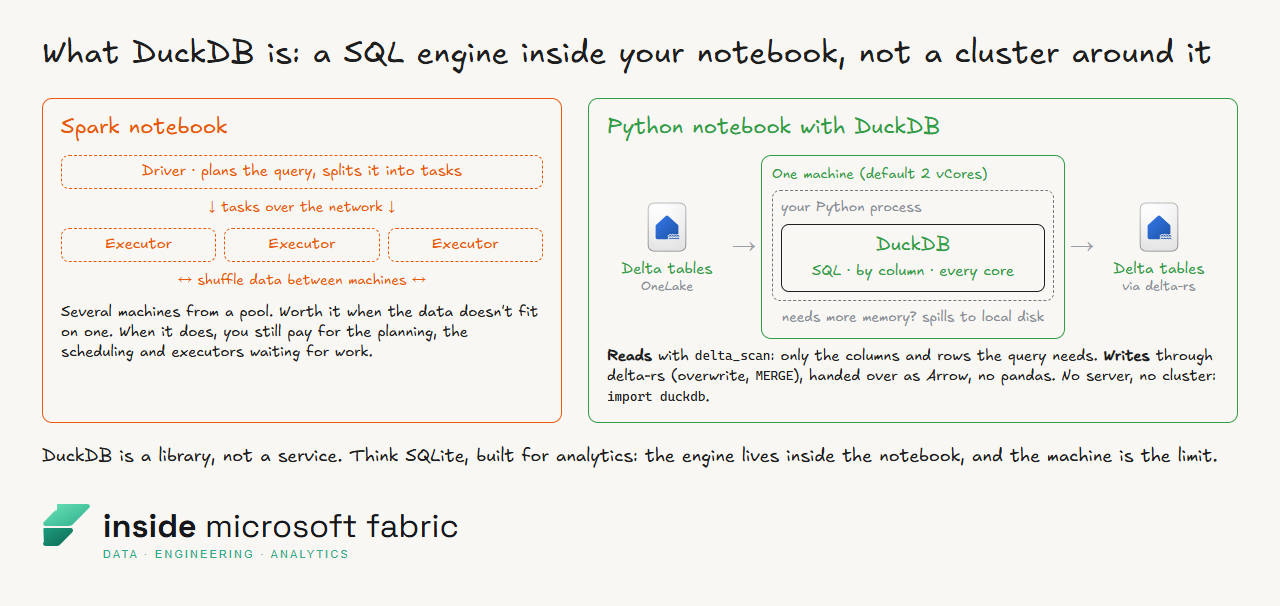
Three things make it fit a Silver notebook:
- It’s built for analytics. It stores and processes data by column and uses every core of the machine, so joins and aggregations over millions of rows take seconds.
- It reads lakehouse tables in place.
delta_scan('abfss://…/Tables/orders')queries a Delta table straight from OneLake, and only reads the columns and rows the query needs. Nothing is loaded into memory first. - It doesn’t fall over when memory runs out. With a
memory_limit, a query that needs more spills to disk and gets slower instead of failing.
import duckdb

con = duckdb.connect()
con.sql("""
    SELECT status, count(*) AS orders
    FROM delta_scan('abfss://<workspace>@onelake.dfs.fabric.microsoft.com/<lakehouse>.Lakehouse/Tables/orders')
    GROUP BY status
""").show()
What it doesn’t do: overwrite or MERGE a Delta table. For writes it hands the result to delta-rs (deltalake, also preinstalled), as shown below. And it runs on one machine: if a table doesn’t fit there, even with spilling, that notebook belongs on Spark.
Polars, also preinstalled, is the DataFrame alternative: the same idea as pandas, written in Rust, multi-threaded and lazy. It’s often faster than DuckDB but has no per-notebook memory cap, which matters when several notebooks share one session. This part uses DuckDB as the default and shows Polars where it differs.
What the Python runtime gives you
Checked in November 2026 with nb_check_python_runtime from the repo:
| Python | 3.12 |
| DuckDB | 1.4.5 |
| Polars | 1.34.0 |
| deltalake (delta-rs) | 1.5.0 |
| Default session | 2 vCores, 16 GB; up to 64 vCores |
| DuckDB defaults | threads = vCores, memory_limit = 80% of RAM, TimeZone = UTC |
Every way to reach a Delta table works: delta_scan('abfss://…') without any secret, the /lakehouse/default/Tables/… mount, pl.scan_delta with a storage token, and deltalake.DeltaTable. Versions move, so run the check notebook in your own workspace before you rely on them.
Your shared functions come too. A Python notebook can’t use an Environment, so the enterprise library from Build 4.1 doesn’t arrive on its own. The fix is one install cell at the top of every Python notebook, reading the wheel from a lakehouse folder that the deploy keeps up to date. After it,
from fabric_utils import *gives you the sameget_paths()and run log as in Spark, plus DuckDB helpers. How it works: Build 4.1 › Python notebooks.
Read with DuckDB, write with delta-rs
DuckDB 1.4 reads Delta natively and only inserts into it: no overwrite, no MERGE, no schema changes (Microsoft’s compatibility table). delta-rs does all three, and DuckDB hands it the result as Arrow record batches, so nothing goes through pandas.
import duckdb
from deltalake import write_deltalake

so = {"bearer_token": notebookutils.credentials.getToken("storage"), "use_fabric_endpoint": "true"}
con = duckdb.connect()
con.sql("SET TimeZone = 'UTC'")

rel = con.sql(f"""
    SELECT customer_id, CAST(created_at AS DATE) AS order_date, count(*)::BIGINT AS orders
    FROM delta_scan('{tables}/bronze_orders')
    GROUP BY ALL
""")
write_deltalake(f"{tables}/silver_daily_orders", rel.fetch_arrow_reader(1_000_000),
                mode="overwrite", schema_mode="overwrite", storage_options=so)
Two details that cost me time:
- Types land as they leave DuckDB.
TIMESTAMPTZbecomes a Deltatimestamp; a plainTIMESTAMPneeds thetimestamp_ntzfeature. Cast in the finalSELECT. - Deletion vectors. delta-rs can’t write tables that have them, and Polars uses delta-rs underneath. Tables shared with Spark need
delta.enableDeletionVectors = false.
Incremental loads: MERGE
from deltalake import DeltaTable

(DeltaTable(f"{tables}/silver_daily_orders", storage_options=so)
   .merge(source=last_days.fetch_arrow_reader(), source_alias="s", target_alias="t",
          predicate="t.customer_id = s.customer_id AND t.order_date = s.order_date")
   .when_matched_update_all()
   .when_not_matched_insert_all()
   .execute())
Size the session, then share it
The session size is the first cell, or the vCores field of the run API or pipeline activity:
%%configure -f
{"vCores": 8}
notebookutils.notebook.runMultiple(dag) runs notebooks in parallel inside that session. Each DuckDB connection assumes it owns every core and 80% of the memory, so in parallel they fight. Give each child a share:
con.sql("SET threads = 4")
con.sql("SET memory_limit = '12GB'")
For Polars, set POLARS_MAX_THREADS before import polars: the thread pool is sized on first import.
This covers running a DAG inside one session. Scheduling it, mixing Spark and Python notebooks in one pipeline, retries and alerts are orchestration, and get their own part in Module 5: Orchestration.
Port a Spark notebook without changing its output
A port that runs faster but writes different rows isn’t a port. Validate every table against the Spark output before you switch, with nb_validate_port from the repo: same schema, same row count, the same null count, distinct count, min, max and hash per column, and a row-level EXCEPT ALL in both directions.
The differences it catches are rarely in your logic. They’re in how Spark and DuckDB read the same SQL:
| Spark | DuckDB | What to write |
|---|---|---|
regexp_replace replaces every match |
replaces the first match | regexp_replace(x, p, r, 'g') |
cast(12.7 as int) = 12 (truncates) |
CAST(12.7 AS INTEGER) = 13 (rounds) |
CAST(trunc(x) AS INTEGER) |
| A failed cast returns NULL | A failed cast raises an error | TRY_CAST |
unix_timestamp(ts): whole seconds |
epoch(ts): fractional seconds |
floor(epoch(ts)) |
| Column names resolve case-insensitively, output keeps the requested name | case-insensitive too, but your Python checks aren’t | alias the column explicitly |
NOT (cond) drops rows where cond is NULL |
the same | nothing: reproduce it, then decide if it’s a bug |
One performance trap: a join whose condition has an OR (ON a.id = b.id AND (c.x IS NULL OR b.x = c.x)) kept DuckDB 1.4 off a hash join, so it took 435 seconds. Written as an equi-join on id, then the OR as a filter, joined back by row: 32 seconds, identical output.
Does it pay off?
I ported 10 production Silver notebooks to DuckDB and Polars, validated every output row against Spark, and ran them at 0.1x, 1x and 10x of production volume. DuckDB on 8 vCores used an estimated 73–83% fewer capacity units than Spark at every size; Polars was faster still, but needed 16 vCores at 10x. The numbers, the method and where Spark starts to come back are in the benchmark article.
The article also sorts jobs into the three kinds that fit a Python notebook best: near-real-time loads on small data, the daily ETL, and service notebooks that only call the Fabric API and should never start Spark.
Put it into practice
- Run
nb_check_python_runtimein your workspace. - Start with
nb_duckdb_quickstart: read, transform, overwrite and merge on generated data, in 30 seconds. - Move your shared helpers into
nb_utils_duckdband port one small dimension first. - Validate against the Spark output with
nb_validate_portbefore you switch anything.