
05 Nov 2026 · Fabric Apps, Architecture
Fabric Apps: agentic development with CI/CD across DEV and PRO
Fabric App items aren't supported by Git integration or deployment pipelines, so the repo has to be the app. Give the agent context, not prompts, and give every number the app shows a written owner.
Our CRM app lives in a Git-connected workspace, next to the reports it replaces. The first time I opened the source control panel there, the reports were listed. The app wasn’t.
That’s not a bug. Fabric App items aren’t supported by Git integration, and deployment pipelines don’t move them either. A workspace connected to Git simply ignores them.
So Fabric doesn’t keep your app’s history. You do. And when an AI agent writes most of the code, that history has to answer three questions the agent will ask every time: what should this app be, where does it run, and what do its numbers mean?
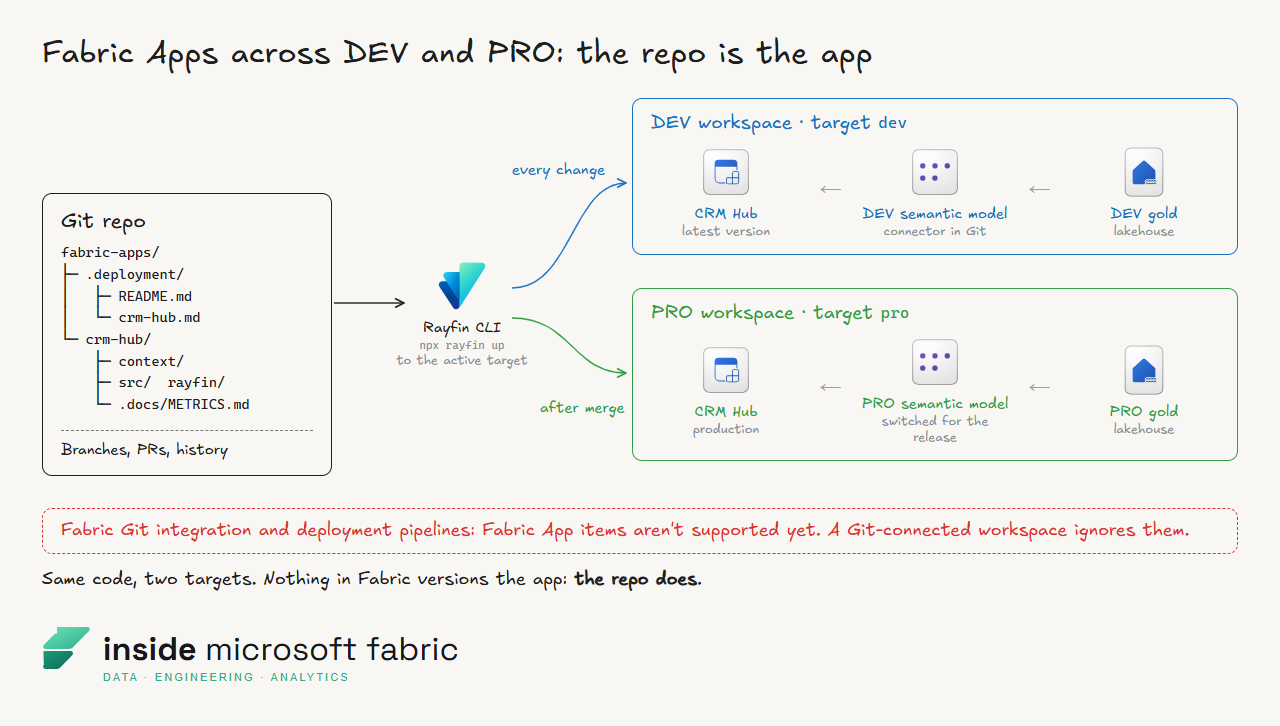
The repo is the app
Check the two lists Microsoft keeps: Git integration supported items and deployment pipelines supported items. Notebooks, lakehouses, semantic models, reports, SQL databases, even data agents. No Fabric App. The Git page is explicit about unsupported items in a connected workspace: they aren’t saved, synced or deleted. They’re ignored.
Microsoft’s own answer is the Rayfin CLI. The dev and prod tutorial deploys the same project to two workspaces with npx rayfin up, switches between them with npx rayfin up switch, and its first recommended practice is “Keep your source code in version control.”
That’s fine, as long as you take it seriously. rayfin up deploys the code, the schema and the connectors to whichever target is active, and it never deploys data. Everything else has to be in the repo: which workspace is DEV and which is PRO, which semantic model each environment reads, what was released when. The target registry itself (rayfin/.deployments.json) is meant to stay out of Git, so a new laptop knows nothing. If it isn’t written down, it lives in one person’s head.
After eight apps in one repo, the setup I’ve settled on is simple. One folder per app. One deployment file per app, with the DEV and PRO model and the DEV and PRO workspace, all written in the same style so anyone can release any app. And a root CLAUDE.md with the rules the agent never breaks: work on a branch, read measures not tables, the committed connector points to DEV, deploy only to DEV.
Give the agent context, not prompts
The part that changed how I work is the context/ folder. Before I open the terminal, each app gets a brief, and three subfolders: images/, docs/, source/.
Images work very well as examples. One screenshot of the old CRM health report explained the problem better than a page of text. Three screenshots of Salesforce gave the agent a look it followed for weeks. A photo of a sketch in a notebook, like the one this article started from, is a perfectly good spec.
Then the prompt is almost boring: follow CLAUDE.md, read the context, create the new app version, don’t deploy yet. The intelligence is in the files, not in the prompt. A new version starts the same way: a new branch, a new image or note in context/, and the agent starts from everything already written.
The one thing I still check by hand is where the numbers come from. An agent takes the shortest path to a screen, and the shortest path is reading tables and rebuilding the logic in TypeScript. That’s the trap from the three data strategies, and it’s why “read the business from the semantic model” is rule number two in CLAUDE.md.
Every number needs a written owner
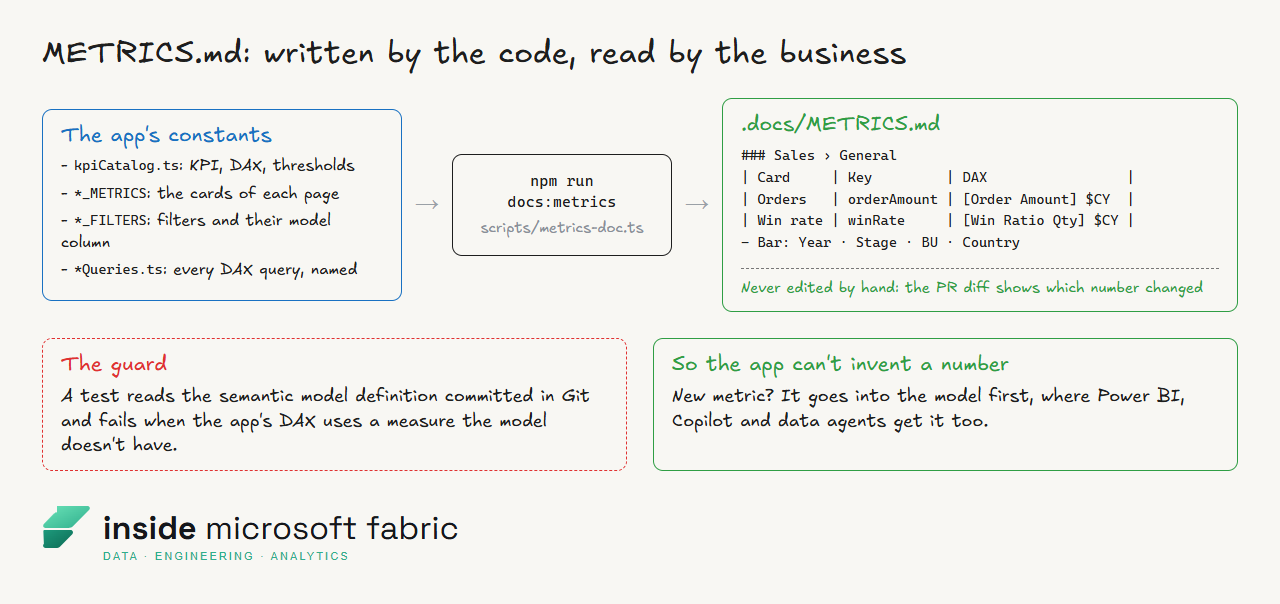
The CRM app has five pages, twelve tabs, sixteen health KPIs, around sixty cards and almost forty filters. “What does Win rate on the Sales page compute?” used to mean reading code.
Now every app has a .docs/METRICS.md: each page, each card, its DAX, its filters and the model column behind each one. And the rule is that nobody writes it. npm run docs:metrics generates it from the app’s own constants. Hand-written metric docs drift the week after they’re written; a generated one can’t describe something the app doesn’t do.
Two things make it worth more than documentation:
- The PR diff is the business review. When a card changes from
[Created Opp. Amount]to[Won Opp. Amount], theMETRICS.mddiff says so in one line a sales manager can read. Nobody reviews TypeScript. Everyone can review a table. - A test guards the model. It reads the semantic model definition committed in Git and fails if the app uses a measure the model doesn’t have. The app can’t invent a number. A new metric goes into the model first, where the reports, Copilot and data agents get it too.
That’s the same position as always, applied to apps: the semantic model is the contract. METRICS.md is just the readable list of which clauses each app uses.
How to set it up
The full how-to is in Build › Fabric Apps across DEV and PRO: the repo layout, the deployment file style, the six steps for a new app, the release commands, the rules that cause incidents (the connector switch, switching back to DEV, --force), the metrics generator and a base repo with the templates.
The recommendation
- Treat the repo as the app. Fabric won’t version it. Every app in one repo, one folder each, merged through PRs.
- Write down where each app runs. DEV and PRO model, DEV and PRO workspace, the release commands. One file per app, same style for all.
- Give the agent context, not prompts. A brief, images, docs and source. Screenshots are the best spec you’ll write.
- Let the agent deploy to DEV only. PRO and
--forceare human decisions. - Generate METRICS.md from the code, and test that every measure the app uses exists in the model.
AI makes building a Fabric App a matter of days. What doesn’t get cheaper is knowing, six months later, what’s in production, where it reads from and what its numbers mean. Fabric doesn’t keep that for you yet, so the repo has to.
How are you versioning your Fabric Apps while Git integration doesn’t cover them? I’d love to compare setups.
Enjoyed this?
Get new articles like this one straight to your inbox.