
Building a Fabric App with an AI agent takes days. Keeping five of them in production a year later is a different job: knowing which version runs where, which semantic model each one reads in each environment, and what every number on every page means.
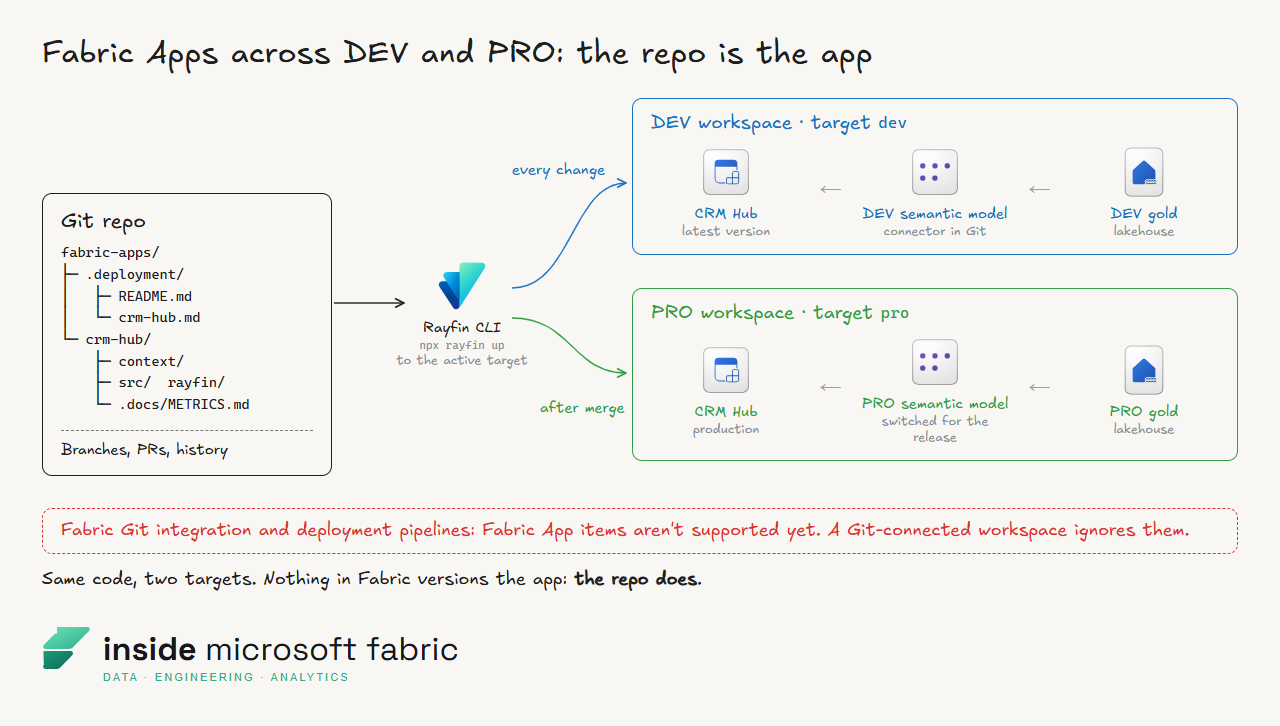
Fabric doesn’t help with that yet. Fabric App items aren’t supported by Git integration or by deployment pipelines, so this part sets up the repo that does the job instead:
- The repo layout: one folder per app, and a
.deployment/folder that says where each one runs. - The context folder: what the agent reads before it writes a line.
- A new app in six steps: branch, context, agent, DEV, PR, PRO.
- DEV and PRO: Rayfin targets, the connector switch and the rules that cause incidents.
- METRICS.md: every number the app shows, generated from the code and checked against the model.
Why, then how. The argument is in the article Fabric Apps: agentic development with CI/CD across DEV and PRO. This page is the how-to, and the repo linked at the end has the templates.
Before you start: requirements
| You need | Why |
|---|---|
| A DEV and a PRO workspace for each app’s destination | The app item is deployed once per environment. Each one gets its own app database |
| The semantic model the app reads, in DEV and in PRO | The app reads the business through measures, not tables (why) |
Node.js and the Rayfin CLI (npx rayfin) |
Builds and deploys the app (CLI reference) |
| Claude Code (or another coding agent) | Writes the app from the context folder |
| Users with Read + Build on the model of their environment | The semantic model connector is delegated: every query runs as the signed-in user, and the model’s RLS decides the rows |
Why the repo has to be the app
Neither the Git integration supported items nor the deployment pipelines supported items include Fabric Apps. A Git-connected workspace ignores the app item: it isn’t committed, updated or deleted. Microsoft’s dev and prod tutorial uses the Rayfin CLI instead, and its first recommendation is to keep the source code in version control.
So the roles are split:
- Git is the history: branches, PRs, merges to
main. - The Rayfin CLI is the deployment.
npx rayfin updeploys the app item, the runtime settings and connectors inrayfin.yml, the schema of the app’s own database and the static site to the active target (whatrayfin updoes). It never deploys data.
1. The repo layout
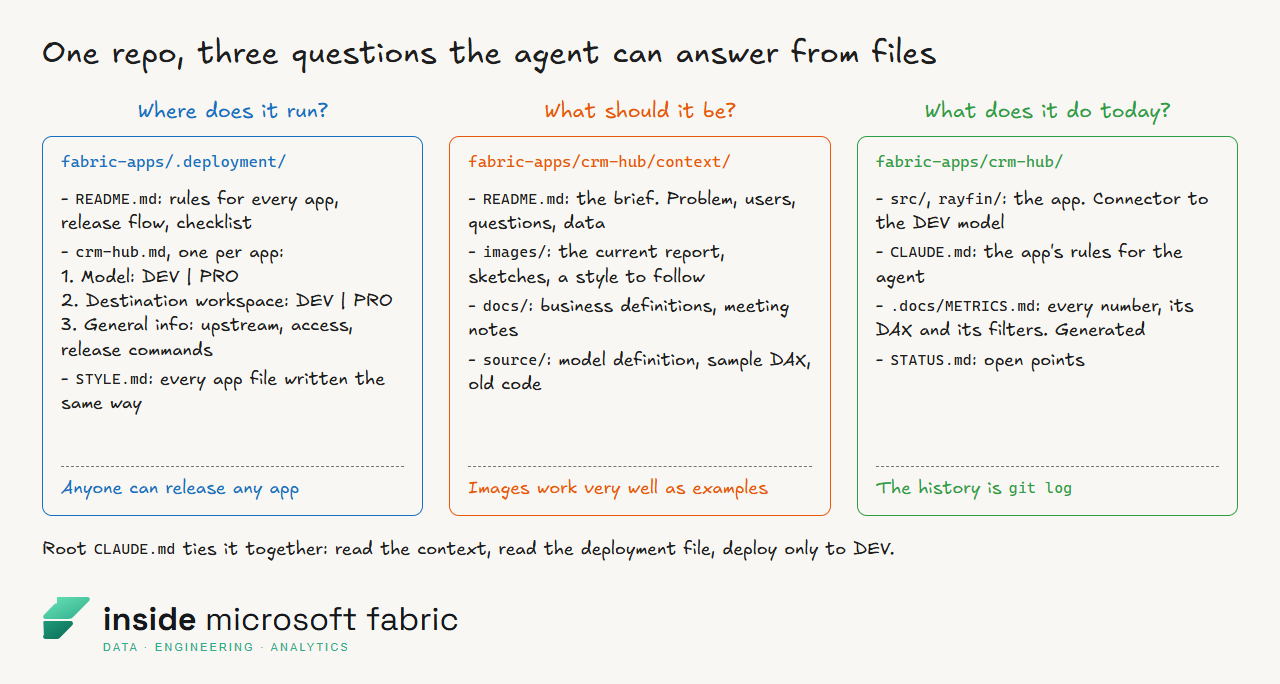
fabric_rayfinapps/
├── CLAUDE.md                 the agent's rules, read first
├── fabric-apps/
│   ├── .deployment/
│   │   ├── README.md         rules for every app, release flow, checklist, apps table
│   │   ├── STYLE.md          how an app's deployment file is written
│   │   ├── _template.md      copy for a new app
│   │   └── crm-hub.md        DEV / PRO model, DEV / PRO workspace, release steps
│   ├── _template-app/        copy to start a new app
│   └── crm-hub/
│       ├── context/          images/  docs/  source/   + README.md (the brief)
│       ├── CLAUDE.md         the app's own rules
│       ├── .docs/METRICS.md  generated
│       ├── src/  rayfin/
│       └── STATUS.md
└── docs/
    ├── new-app.md
    └── metrics-strategy.md
.deployment/: where each app runs
README.md holds what’s common to every app: the release flow, the rules below and a checklist. Then there’s one file per app, always with the same three sections:
| Section | Content |
|---|---|
| 1. Model | DEV | PRO table: the semantic model the app reads, its workspace and item id, the lakehouse behind it, the connector name |
| 2. Destination workspace | DEV | PRO table: workspace, Rayfin target name, item name, item id, app database tables, URL |
| 3. General info | Status, upstream dependencies in release order, access, first-time setup, release to PRO, pending |
STYLE.md makes every app file read the same way: the same rows in the same order, names and ids (names change, ids don’t), copy-pasteable commands, and unknown values written as Pending to confirm, never guessed. That consistency is what lets someone, or the agent, release an app they didn’t build.
The root CLAUDE.md: the agent’s rules
The rules the agent must never break go here, not in a prompt:
1. Work on a feature branch. Never commit to main.
2. Read the business from the semantic model. If a measure doesn't exist, propose it
   for the model; don't rebuild it in TypeScript.
3. The app's own database is only for what the app creates.
4. The committed connector points to DEV.
5. Deploy only to DEV, and only when asked. Never PRO, never --force.
6. Keep METRICS.md, the app's CLAUDE.md and .deployment/<app>.md in step with the code.
7. Unknown values are written "Pending to confirm".
2. The context folder
Fill fabric-apps/<app>/context/ before you open the terminal:
| Folder | Put here | Why |
|---|---|---|
README.md |
The brief: problem, users, the questions the app must answer, the measures to use, what’s out of scope | The agent’s starting point |
images/ |
The report the app replaces, sketches, screenshots of an app whose style you like | Images work very well as examples. One screenshot replaces a page of description |
docs/ |
Business definitions, meeting notes, existing requirements | The words the business uses |
source/ |
Model definition (TMDL), sample DAX, old code | What the agent must reuse, not reinvent |
Images are examples to follow, not assets to ship. In the CRM app, one screenshot of the old health report explained the problem, and three screenshots of Salesforce gave the agent a look it followed for weeks.
The context grows with the app: a new version starts with a new image or a new note in context/.
3. A new app in six steps
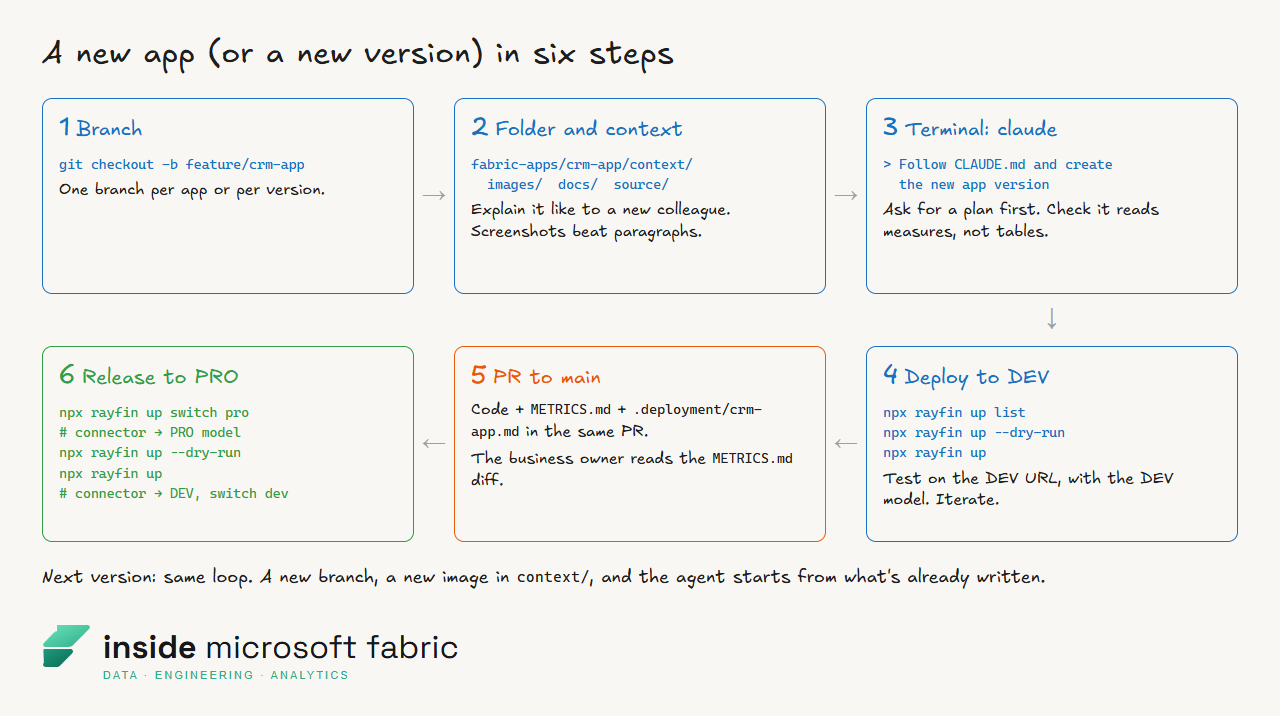
1. Branch.
git checkout main && git pull
git checkout -b feature/crm-app          # a new app
git checkout -b feature/crm-app-alerts   # a new version
2. Folder and context.
cp -r fabric-apps/_template-app fabric-apps/crm-app
Then fill context/ as above.
3. Build with the agent.
claude
Follow CLAUDE.md and docs/new-app.md. Read everything in fabric-apps/crm-app/context/
and create the first version of the app in fabric-apps/crm-app: Rayfin project,
semantic model connector to the DEV model, the pages in the brief. Create the app's
CLAUDE.md, .deployment/crm-app.md from the template, and the metrics generator.
Don't deploy yet.
Ask for a plan before code, and check one thing in it: every number comes from a measure of the model. An agent takes the shortest path to a screen, and the shortest path is reading tables.
4. Deploy to DEV and test. The first time, register the target with --dry-run first, to check it creates the item where you expect (or reuses the existing one):
cd fabric-apps/crm-app
npx rayfin up --workspace-id <dev-workspace-id> --item-name "CRM Hub" --dry-run
npx rayfin up --workspace-id <dev-workspace-id> --item-name "CRM Hub"
npm run docs:metrics
Open the DEV URL and iterate with the agent until it’s right.
5. PR to main, with the code, the app’s CLAUDE.md, .docs/METRICS.md and .deployment/crm-app.md, in the same PR.
6. Release to PRO, from the merged code. Next section.
4. DEV and PRO
Each app has two Rayfin targets: DEV runs the latest version against the DEV semantic model, PRO runs production against the PRO model. Register the PRO target once, the same way:
npx rayfin up --workspace-id <pro-workspace-id> --item-name "CRM Hub" --dry-run
npx rayfin up --workspace-id <pro-workspace-id> --item-name "CRM Hub"    # with the PRO connector
Then every release is:
npx rayfin up list                  # the active target is marked with *
npx rayfin up switch <pro-target>
# rayfin/rayfin.yml: connector → PRO semantic model
npx rayfin up --dry-run
npx rayfin up
# rayfin/rayfin.yml: connector → back to the DEV model
npx rayfin up switch <dev-target>
The rules that cause incidents
- Upstream first. Gold notebooks, then the semantic model, then the app. An app released before its measure reaches the PRO model shows an error, not a number.
- The connector is one value per project, not per target. The semantic model connector in
rayfin.ymlpoints to one workspace and one model, so the release switches it to PRO, deploys and switches it back. The committed version always points to DEV. - Switch back to DEV after every release.
npm run devandnpx rayfin upuse the active target. If PRO stays active, your next local session runs against the PRO database. - Targets are local.
rayfin/.envandrayfin/.deployments.jsonstay out of Git (project structure), so a new laptop knows nothing. That’s why the ids live in.deployment/<app>.md. - Each target has its own app database. Only the schema moves. Destructive schema changes need
--force. Release them to DEV first, and never use--forceagainst PRO without a plan for the data. The tutorial gives the same advice. - Sign-in redirect URIs. Each target’s URL must stay in
services.auth.allowedRedirectUrisinrayfin.yml. Don’t remove any. - Check the deployed app. Open the PRO URL and check that it shows PRO data.
Release checklist
- Change tested on the DEV URL
.docs/METRICS.mdregenerated and committed- PR merged to
main - Upstream (notebooks, model) released to PRO
- Schema change? Released to DEV first, no
--forceon PRO - Switch to PRO target → PRO connector →
--dry-run→npx rayfin up→ DEV connector - PRO URL checked
- Back on the DEV target (
npx rayfin up list)
From a laptop to a pipeline
Microsoft documents a GitHub Actions workflow that signs in with a service principal and runs rayfin up. It needs the tenant setting that lets service principals use Fabric APIs, and Contributor on the target workspace. Once the connector switch is parameterised, the PRO release can become a workflow with a manual approval, like the deploy stage in Custom Environment.
5. METRICS.md
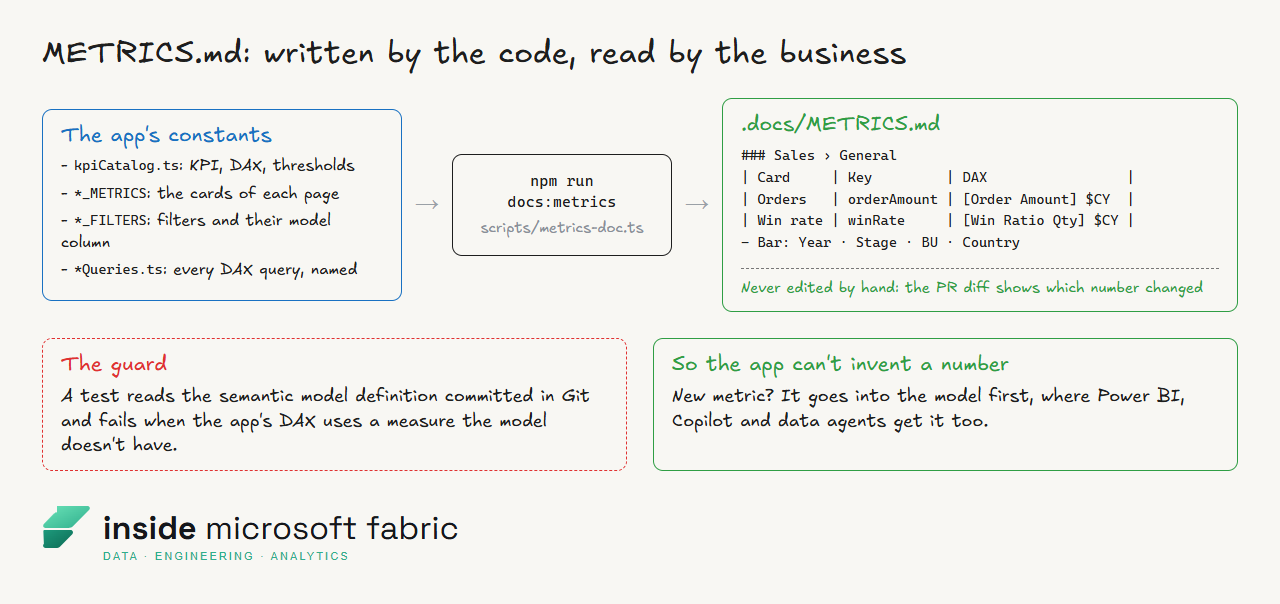
Every app has a .docs/METRICS.md that answers, for every page: which cards it shows, the DAX behind each one, which filters it has and the model column each one filters, and the thresholds that colour a KPI amber or red. It’s what the business owner reviews and what the agent reads before it changes a page.
Nobody writes it. npm run docs:metrics generates it from the app’s own constants, so it can’t describe something the app doesn’t do.
What the app needs for it
The definitions have to be data, not scattered through components:
| Constant | Holds |
|---|---|
KPI catalog (src/services/kpiCatalog.ts) |
Key, label, description, DAX, amber and red thresholds, where the user acts on it |
Page cards (*_METRICS, exported from the page components) |
The cards of each page: key, label, DAX for the period and the previous year |
Filter sets (*_FILTERS, exported from the filter panel) |
The filters of each page, and the model column behind each one |
Query builders (src/services/<app>Queries.ts) |
All DAX as named functions. User values only through an escaping helper |
The generator
// package.json
"scripts": {
  "docs:metrics": "vite-node scripts/metrics-doc.ts"
}
// scripts/metrics-doc.ts (skeleton)
import { writeFileSync } from 'node:fs';
import { KPIS } from '../src/services/kpiCatalog';
import { SALES_METRICS } from '../src/components/Dashboard';
import { SALES_FILTERS, FILTER_COLUMN } from '../src/components/FilterPanel';

const lines: string[] = ['# CRM Hub — metrics and filters', '', 'Generated by `npm run docs:metrics`. Do not edit.', ''];

lines.push('## KPIs', '', '| KPI | DAX | Amber | Red |', '|---|---|---|---|');
for (const k of KPIS) lines.push(`| **${k.label}** (\`${k.key}\`) | \`${k.dax}\` | ${k.amber} | ${k.red} |`);

lines.push('', '## Sales', '', '| Card | Key | DAX |', '|---|---|---|');
for (const m of SALES_METRICS) lines.push(`| ${m.label} | \`${m.key}\` | \`${m.dax}\` |`);
lines.push('', `- **Filters**: ${SALES_FILTERS.map((f) => f.label).join(' · ')}`);

lines.push('', '## Filters: model column', '', '| Filter | Column |', '|---|---|');
for (const [key, col] of Object.entries(FILTER_COLUMN)) lines.push(`| \`${key}\` | \`${col}\` |`);

writeFileSync(new URL('../.docs/METRICS.md', import.meta.url), lines.join('\n') + '\n');
For scale: the CRM app’s generated file covers five pages, twelve tabs, sixteen health KPIs, around sixty cards and almost forty filters. Nobody would keep that up to date by hand.
The guard: only measures the model has
Add a test that reads the semantic model definition committed in Git (TMDL) and fails when the app’s DAX references a measure the model doesn’t have. The app can’t invent a number. A new metric goes into the model first, where the reports, Copilot and data agents get it too.
Two habits
- Regenerate in the same PR as the change that alters a KPI, card or filter.
- The business owner reads the
METRICS.mddiff, not the TypeScript. When a card changes from[Created Opp. Amount]to[Won Opp. Amount], the diff says so in one line.
Put it into practice
- Get the repo below. It has the root
CLAUDE.md,fabric-apps/.deployment/(common README,STYLE.md,_template.md),fabric-apps/_template-app/with the emptycontext/folders, and the guidesdocs/new-app.mdanddocs/metrics-strategy.md. - For your first app, copy
_template.mdto.deployment/<app>.mdand fill the DEV and PRO model and workspace. Leave what you don’t know as Pending to confirm. - Copy
_template-app/tofabric-apps/<app>/and fillcontext/, starting with the screenshots. - Open
claudein the repo and follow the six steps above. Deploy to DEV, merge, release to PRO with the checklist. - Add the metrics generator and the measures test before the app’s second page, not after its tenth.